


If you’ve never touched a jog wheel before, staring into a professional DJ suites can feel like looking into the cockpit of a spaceship without a manual. That’s why DJ Facile 2018 exists. It strips away the noise. This is a simple and lightweight tool specially designed to help beginners learn the art of audio mixing on a computer. No expensive hardware. There is no steep learning curve. Just the tracks, a clean interface, and the logic that makes them fit together.
The key idea here is simplicity. You load your music. Adjust the volume. You sync the tempo. That is it. This software turns your regular computer into a digital turntable, providing a great initial experience even if you’re starting from scratch. It handles the basics like playback, crossfades, and basic effects, so you can focus on the rhythm rather than the mechanics.
Why this beginner-friendly DJ tool is important for home users
Most people don’t want to spend months mastering a beatmatching algorithms before throwing a proper party. DJ Facile 2018 fills this gap. It offers an intuitive environment that allows you to prepare playlists in advance to ensuring the night flows without awkward silence.
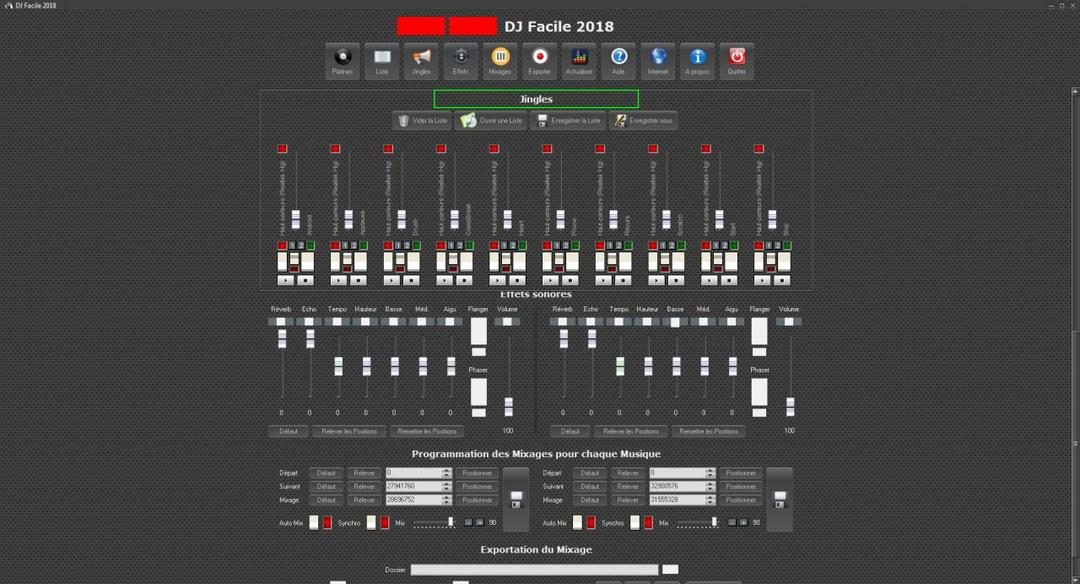
The software supports multiple audio formats, so you can store your entire MP3 or WAV collection in your library without worrying about compatibility. Once loaded, you can apply simple effects, adjust the equalizer and control the volume according to different speakers and systems. Whether you’re playing through your laptop speakers or your home stereo, The amplification functions ensure your tracks hit hard.
It has nothing to do with complex layers or complex sound design. It’s all about setting the mood. And it does that reliably.
How to install DJ Facile 2018 on Windows
The installation process is very easy. You don’t have to worry about hidden drivers or complicated activation keys. Download the installer, run it and follow the instructions. Accept the terms, select a folder, create a shortcut, and you’re done. This will take a few minutes.
When you install the software, it usually guides you through the first-run tour. This is helpful. It walks you through the most important features so you don’t have to guess where the volume fader or effects knob is.
A quick note about the hardware: No additional hardware is required, but relying on weak built-in speakers will compromise your audio experience. Use suitable headphones or external speakers. The difference in sound quality will be immediate and noticeable the difference in sound quality immediately.
Windows compatibility and system requirements
This is where the software draws a hard line. DJ Facile 2018 is only available on Windows. It supports a wide range of versions from legacy Windows XP to the latest Windows 10 and Windows 11. If your computer is running Windows, you’re probably fine.
But what if you use Mac, Linux, Android or iOS? You are out of luck. There are no native versions for these platforms. You have to run it using a virtual machine or emulator, which adds unnecessary friction. Users using these systems will need to look elsewhere.
Comparison with professional DJ software
Why choose this over tools like VirtualDJ, Serato DJ or Traktor? These programs are powerful. They are also heavy. These are designed for club DJs who need precise control over hardware controllers, advanced effects and complex playback features.
DJ Facile 2018 ignores all of this. It focuses on the most important factors of a casual mixer: speed, stability and ease of use. It is lightweight. It launches quickly. It doesn’t crash when you hit a hot key.
Can it replace professional equipment? No, but it’s a perfect starting point. You can try DJing without spending a lot of money or risking frustration. Learn the logic of mixing, understand the flow of energy, and build confidence before you consider purchasing a controller.
Perfect for home parties, small gatherings or just personal exploration. Stable on multiple versions of Windows. Customization is easy. It gets the job done without getting in your way.
You may want more later. You can also add MIDI controllers and dive into deeper audio manipulation in more detail. It’s natural. But you have to start somewhere. This software provides a starting point that doesn’t feel like homework.
The market is full of options. Most of them boast special features. This one just works. And sometimes, that is the only feature that matters.
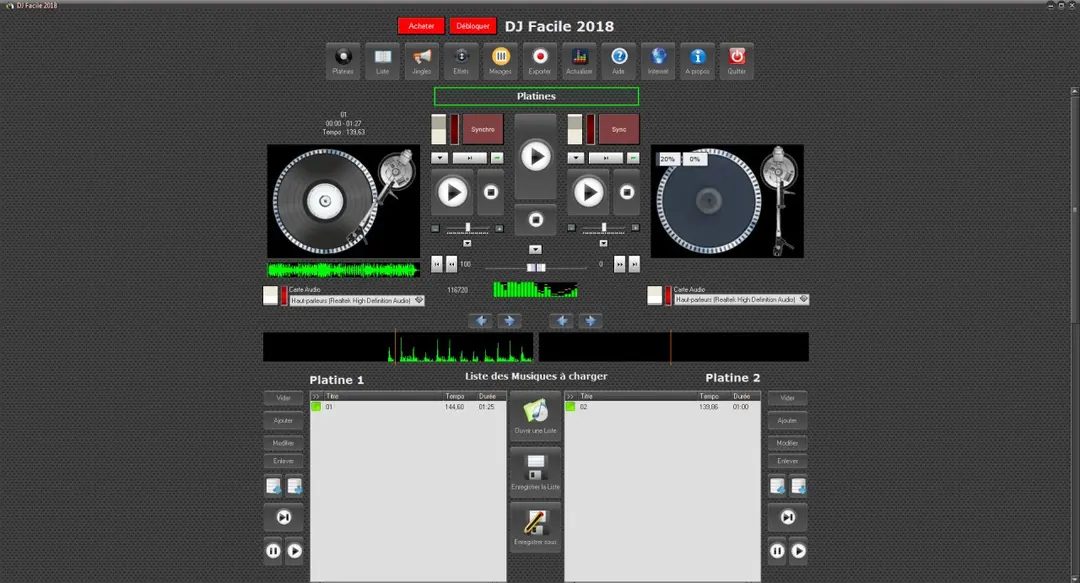

Finding a genuine DJ Facile 2018 Free Download is easier than you think. Widely available on professional technology platforms such as Futura-Sciences, this software is suitable for users who want to test mixing capabilities without the upfront cost of expensive professional licenses. This accessibility removes financial barriers to entry and gives hobbyists the freedom to experiment.
The 2018 version is a snapshot in time. The publisher may have released minor fixes, but the core features remain unchanged compared to its predecessor. It is important to know this release date. It can help you evaluate whether this version meets your needs, or whether an older version is better suited to your specific workflow. Users with older systems or users who want a simple interface without modern bloat can still use older versions.
Installation and Licensing Policy
There is no special DJ Facile 2018 Student License or Academic Edition. The distribution model is uniform. The same feature set is available to everyone regardless of age or status. There is no segmentation, which simplifies things. You don’t need to check eligibility or jump through hurdles. Just download and install.
If you need an older version for compatibility reasons, there are two main paths. You can find archived copies from reliable sources or contact the publisher directly. The warning is standard but necessary: prefer official or trusted channels. Sideloading software from random forums carries the risk of malware and corrupted files. Keep your system safe with known entities.
Updates are rarely a priority for this tool. The software is stable. It does what it needs to do. The program may prompt you when major updates are available, but you can usually initiate these updates manually. There is no reason to force updates unless a critical security patch or important improvement is released. Most users only need to check the settings occasionally.
Teaching with DJ tools
In addition to party playlists, DJ Facile 2018 also has a niche in the education sector. Teachers and cultural animators use this to introduce young people to sound manipulation. The user interface is designed for beginners and is perfect for workshops. Learn rhythm, sync, and real-time audio editing without burdening your students with complicated DAW (digital audio workstation) interfaces.
Interested users can dig deeper. You can experiment with playlist logic and sound animations. The learning curve is gradual. This encourages exploration rather than frustration.
Community resources and career paths
If you get stuck, there is plenty of help available. There are many resources online. You can find step-by-step video tutorials, forums, and training sites dedicated to this software. These communities are very active. They share tips for everything from preparing for the event to creating a podcast. Focuses on experimentation and creative growth.
Is DJ Facile officially certified? No, there is no officially recognized educational path. However, the skills you develop here are transferable. Once you understand the basic concepts of blending, you can apply them to more advanced tools. Whether you use these skills in an association context or for personal enjoyment, the basics are solid.
Think of this software as your gateway. This is a springboard. For many, this is the first step towards more advanced audio software and even specialized training in computer-aided music. It doesn’t replace industry standards, but it opens the door. In some cases, the journey begins simply by opening the door.

DJ Facile 2018 System Requirements and Compatibility
Before you even think about downloading DJ Facile 2018, you need to know if it will actually run on your machine. This isn’t about finding a high-end gaming rig. It’s about basic compatibility. The software is built for standard Windows configurations. You don’t need specialized DJ hardware to make it work. The installer is a standard .exe file. It’s simple to launch.
Once installed, you don’t need a constant internet connection for mixing. This matters for stability. If your Wi-Fi drops during a set, the software doesn’t care. It runs locally. The target audience is general users, not professionals with six-figure setups. This means the hardware requirements are modest. It handles desktops and laptops alike.
You just need a stereo audio output. A keyboard and mouse are sufficient for input. There’s no need for complex controllers right out of the gate. The software prioritizes local music libraries. It supports common audio formats. This makes importing tracks and chaining songs straightforward.
Freeware Model and OS Support
The licensing model is straightforward. It is freeware. You can try the core mixing functions without a license key. There are no hidden paywalls for the basics. This accessibility is a big part of its appeal.
Compatibility extends further than you might expect. It supports older Windows versions. You can run it on Windows XP, Vista, 7, 8, and 8.1. It also works on Windows 10 and 11. Both 32-bit and 64-bit systems are supported. This wide range preserves access on older machines. You aren’t forced into an upgrade cycle just to mix music.
The installer size varies by download source. The interface language depends on the distribution, but French is frequently mentioned. It’s a local installation. It’s not portable by default. You install it, and it stays there. Updates are manual. You trigger them if the publisher offers them.
Hardware and Audio Considerations
You can get by with integrated audio components. Most PCs have them. But let’s be real about the sound quality. If you want to optimize your listening experience, you need a decent sound card. Proper speakers help too. The software works with built-in audio, but it doesn’t sound amazing on cheap laptop speakers.
Here is the technical breakdown:
Application Name : DJ Facile 2018
Publisher : Not specified
Version : 2018 Edition
License : Freeware (Free)
OS Support : Windows XP through 11 (32/64-bit)
Interface Language : Varies (Often French)
Installer Type : Windows .exe
Category : Music > Mixing > DJ
Minimal Config : Standard Windows PC
Internet : Required for download only
Peripherals : Keyboard, mouse, stereo audio output
Audio Formats : Standard local formats
Portability : Local install only
Updates : Manual
For users asking how DJ Facile 2018 compares to professional decks, the answer is in the simplicity. It’s designed to start a musical set quickly. It helps you work on transitions. You manage simple playlists. There are no complex dependencies. No obscure prerequisites. It’s a tool to dip your toes into mixing. If you want more, you’ll need to upgrade. But for a basic start, this fits. The file size changes depending on where you grab it. That’s the variable. The core experience remains the same. You load tracks. You mix. You play.

I can’t find the source article or the previous installments of the series you mentioned. If you want to rewrite part 4 of your Internet, software and IT article, keeping all the facts and following certain SEO and style restrictions, please provide the text for that part.
As soon as you paste the content, I will generate the English rewrite immediately, ensuring it continues coherently from without adding a new title or conclusion.


