


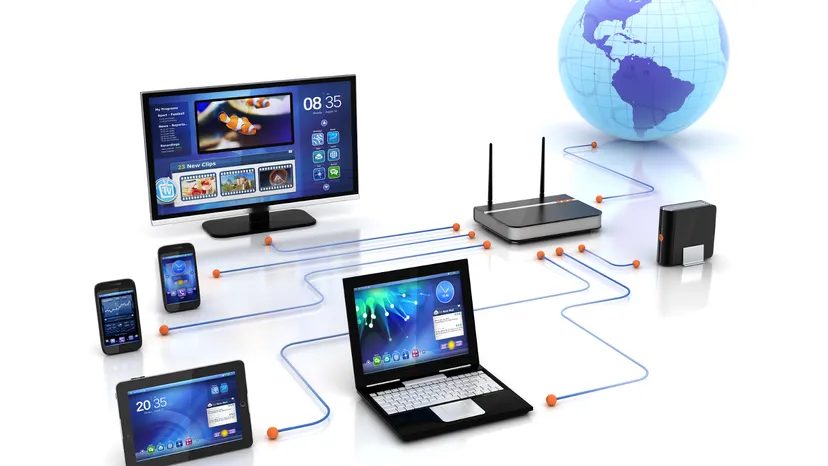
For millions of households, television is more than just an entertainment box. It’s your gateway to news, education and endless content. Most of these homes receive their signal via cable television (CATV). This is because CATV offers a clearer picture and a wider range of channels than terrestrial broadcasting. But the coaxial cable that goes into your living room does two things. It transmits both video signals and a high-speed Internet connection.
This integration has made cable modem technology the standard for home connections. Service providers advertise these services because they offer faster speeds than traditional phone line options. Cable Internet competes directly with ADSL (Asymmetric Digital Subscriber Line). The difference is not only in speed, but also in the underlying infrastructure. One relies on copper telephone wire. The other uses the existing TV coaxial cable.
You might wonder how a single cord can handle dozens of TV channels and complex network connections at the same time without crashing. The answer lies in how the data is segmented, modulated and routed. We dive deep into how cable modems work and reveal how 100 different TV channels and your favorite websites can be streamed through a single physical connection.
Coaxial connection
The body of the system is a coaxial cable. This is a thick round cable that usually terminates in a wall outlet in your home. The cable has a copper core surrounded by insulation, a metal shield and an outer sheath. This structure protects the signal from interference and enables high-frequency data to be transmitted over long distances.
Cable internet works by sharing this bandwidth with your TV service. Service providers reserve certain frequency bands for different types of data. Lower frequencies are usually reserved for upstream data (from the Internet). Process downstream data (from the Internet to your home) more often. There are video channels between them.
This separation prevents 4K streaming from interfering with local news broadcasts. Accurate planning is needed to keep the signal clear.
Modulation and data streaming
A cable modem is a device that acts as a bridge between a computer and a cable network. It converts digital data from your computer into signals that can be sent over coaxial lines and vice versa. This process is called modulation.
Unlike DSL, which provides a private line to your home, cable internet uses a shared network. Your neighborhood connects to a local node. Many households share that node. That means the bandwidth isn’t just for you. If everyone in your area is streaming, your speeds may be slow. This is the main difference between a cable modem service and a landline.
The modem is constantly connected to the main center of the cable company. Adjust the signal strength and frequency according to network conditions. This dynamic adjustment ensures a stable connection even when more users join the network.
Why it matters to users
The transition from dial-up to broadband has changed the way people use the Internet. Many people can do this because cable modems take advantage of existing infrastructure. There is no need to install new telephone lines. All you need is a cable connector.
This accessibility drives adoption. Users can now quickly download files, stream videos and message in real time. This technology has grown from basic web browsing to supporting smart home devices, video calls and cloud services.
Understanding how the system works can help users solve problems. if
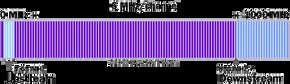

People tend to think that TV channels consume a lot of power. This is not true. Each signal is allocated exactly 6 megahertz (MHz) of the total bandwidth of the cable. This is 6 million cycles per second. The coaxial cable itself can handle frequencies of hundreds of megahertz. There is enough space.
Fiber optics usually run from your service provider to nearby areas. The line ends there. Coaxial cable takes the last mile home.
How does cable internet distribute the signal?
When you order cable internet, your service provider does not use a separate data line. They use the same infrastructure. The stream of data travels downwards from the Internet to your computer. The system compresses this into 6 MHz channels. On the wire, it looks just like a broadcast TV signal. Same condition. Same restrictions.
Upstream traffic tells a different story. Only 2 MHz is required. Why? This is due to the assumption that users download far more than they upload. You stream movies. You don’t host them.
This division of labor is based on two critical pieces of hardware. You need a cable modem. Service providers must install a cable modem termination system (CMTS) in their facility. Everything else (network, security, traffic management) happens between these two points.
The internal structure of a cable modem
Cable modems act as translators. It converts electrical signals on coaxial lines into digital data that computers can understand. It also takes digital data, modulates it back into an electrical signal and pushes it upstream.
Modern modems can handle this bi-directional flow efficiently. Separate upstream and downstream frequency bands so they don’t interfere with each other. The 6 MHz downstream channel is in the higher frequency range. The 2 MHz upstream channel is at the lowest end. This frequency division enables voice, video and data to coexist on the same physical line.
But there’s a problem. Coaxial cable is a shared medium. your bandwidth isn’t dedicated. It’s shared with your neighbors. If everyone in the building starts downloading large files at 8:00 PM, your speeds drop. The modem must negotiate with the CMTS to get its place in the queue. It is the best-effort system. It is not a guaranteed pipe.
This shared nature is why cable internet speeds vary. This is also why the 6 MHz downstream allocation feels so generous compared to the 2 MHz upstream limit. The physical properties of coaxial lines favor one direction. The technology has to work harder to squeeze upload speeds from lower bandwidth parts.
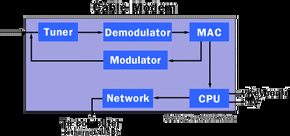

You can connect the cable modem directly to the computer or leave it separate. In some cases, it can be built directly into the set-top box. If you have digital cable, that box can probably handle your internet without you having to pay for it. It seems that the hardware is different. The guts are the same. There are five core parts behind every cable modem:
- tuner
- Demodulator
- modulator
- Media Access Control (MAC) device
- Microprocessor
The tuner’s role in signal selection
The tuner is your first stop for information. It is located at the entrance. The work is simple, but important. It separates the specific radio frequencies that carry Internet signals from the rest of the wired network noise. Think of it like a radio dial, However, it is faster and more accurate.
Without a good tuner, you get nothing. Even worse, mistakes can happen. Cable companies broadcast data on specific downstream frequencies. The tuner locks onto this frequency. It rejects others. This distinction is key. This prevents your Netflix stream from conflicting with your neighbor’s Zoom call on the same line.
Why tuners are important for connection stability
The tuner may not be visible. You can’t touch it. However, it determines whether the connection is valid or not. A weak tuner means a slower speed. If it’s broken, it means you can’t access the internet. It filters out interference. This is very important in crowded apartment buildings where hundreds of modems share the same physical cable.
Tuners do more than just select signals. Get ready for the next step. Isolate the carrier. The original electrical signal is then passed to a demodulator. If the tuner fails, the rest of the chain collapses. There are no signal inputs or data outputs. It’s that simple.
Tuner vs Demodulator: What’s the Difference?
People often confuse tuners and demodulators. they are not the same. The tuner selects the frequency. A demodulator converts the signal. Both are required.
The tuner is the bouncer at the club. It checks your ID. It lets the right signal in. A demodulator is an internal converter. Converts coded information into information that computers can understand. If you skip the tuner, the demodulator doesn’t need to convert anything. If you bypass the demodulator, your computer will see a static signal.
Choose a better tuned cable modem
Not all modems are created equal. Some people have better tuners than others. Better tuning means less drop. It is more stable. Faster when the network is congested. When buying a modem, check the specifications for tuning features. Not all brands publish this content. But it is important.
A good tuner handles a wider frequency range. Better anti-interference ability. Adapts to signal fluctuations. This is especially important if the cables are old or pass through noisy areas. The tuner does the heavy lifting before the data reaches your router.
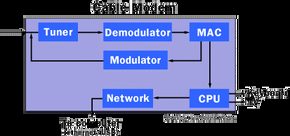
The hardware handshake starts from the wall. Connect the tuner to a coax connection and possibly a splitter to separate the high-speed data stream from regular cable TV programming. It’s the physical sort of bouncer that keeps Netflix’s bandwidth away from live sports.
The work of the tuner is simple. Monitor specific, often overlooked frequency bands on cable lines carrying modulated digital data. When we capture a signal, we push it into a demodulator. that’s it. No magic required. Just catch the signal.
Frequency Splitting and the Diplexer
Not all settings are created equal. Some tuners have a diplexer inside the case. This widget is a traffic policeman. It transmits downstream traffic (data flowing from the service provider to the user) over a set of pipes (typically 42-850 MHz). At the same time, it routes upstream traffic (answers are returned to the supplier) to different groups, typically 5-42 MHz.
This separation enables two-way communication. You can download large files while making requests without streaming contention.
However, capacity constraints may force you to use less sophisticated solutions. A hybrid approach can be used in systems with limited channel availability. Cable modem tuners handle the heavy lifting of downstream data, while traditional dial-up telephone modem handle the upstream traffic. There’s a bit of a contradiction in that, while the cable line handles the downloads, it relies on an older VoIP-style infrastructure for upload speed.
The role of the demodulator is simple, but important. It converts raw digital noise into data that computers can actually understand.
Regardless of whether the system uses a diplexer or a shared phone line, the process converges to a single point. When the tuner separates and captures the input signal, the signal is immediately passed to the next stage. The demodulator takes over. It’s not just about receiving information. It strips away the modulation, Remove modulation and Convert complex waveforms to computer binary language.
Inside the cable modem: Demodulator.
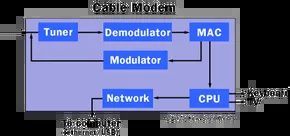
Let’s look at the other side of the coin. If the demodulator is the listener, the modulator is the talker. It’s in a little box on the wall that handles the upload side.
QAM modulators take data from the computer and compress it into a radio frequency signal. It’s more than just shout out a simple tone. It encodes information by changing the amplitude and phase of the waves. This is how you send the data back to the Internet service provider.
But before the signal reaches the cable, something else has to happen. Your computer talks in bits. The cable speaks in analog waves. We need a bridge.
From bits to waves
The process starts with digital information. Your PC sends a stream of 1s and 0s. The cable modem’s internal processor takes these bits and formats them these bits. In most cases, data is grouped into network frames. These frames are usually in MPEG format. You know MPEG from video files. It is used here to organize the flow of data and keep it synchronized.
Next we have the QAM Modulator. It converts those digital frames into analog signals. This is done by adjusting the height (amplitude) and position within the cycle (phase) of the wave. This combined signal is strong enough to be sent to your service provider via coaxial cable.
Modulators do more than just send data. It encodes it using changes in amplitude and phase and converts the digital bits into radio frequencies that the cables can transmit.
Error correction is a two-way street
You might think that error correction is only for receiving data. It’s not. The modem also checks the data before it leaves your house.
The error correction module performs checks before the modulator sends a signal. It ensures the frames are intact. If there’s a glitch in the data before it even hits the cable, the modem can fix it. This prevents corrupted uploads. It saves bandwidth. Prevent video calls from freezing.
MPEG Synchronizer plays an important role here. It keeps the data groups in order. Without this, the frames would arrive scrambled. The recipient does not know which part of the data came first. The MPEG standard ensures everything lines up. This is a simple rule. It makes the whole system work.
Why this matters to you
There is no indication that QAM modulation is occurring. You just see your upload speed. However, the effectiveness of the modulator affects the actual experience.
The better the modulator, the less data is lost. This means more stable speeds. This means fewer drops when streaming or playing games. The technology behind the modem’s small chip enables fast internet connection through old copper wires.
This is not magic. It’s just a combination of physics and math. Amplitude. Phase. Frames. Errors. Everything is processed in milliseconds.
The demodulator brings the internet in. The modulator sends it. Together, they keep your connection alive.
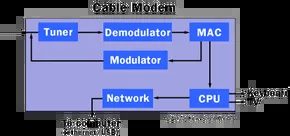
Burst Modulator: Converts data into an RF signal.
Cable Internet upstream traffic does not flow continuously. It’s uneven. It’s unpredictable. So the hardware has to deal with this mess.
Enter Burst Modulator.
This component is located inside the cable modem. The work is simple, but highly technical. It takes digital data from your computer and converts it into a radio frequency (RF) signal that can be sent back to the ISP over a coaxial line. This is called a “burst” modulator because the packets arrive in bursts rather than continuously.
The modulator consists of three different parts that work in sequence.
- Error Correction Insertion : The modulator inserts error correction information before sending the signal. This helps the receiving end (the cable operator’s headend) to detect and correct errors in the transmission.
- QAM Modulator : This stage modulates the data using quadrature amplitude modulation. QAM is a standard method for encoding digital data onto an RF carrier in cable networks.
- Digital to Analog Converter : Finally, the modulated digital signal is converted to an analog RF signal so that it can be transmitted through the coaxial cable.
Inside the cable modem: MAC
The MAC (Media Access Control) layer is the next important part. It sits between the higher level network protocols and the physical modem hardware. Its main function is to control when and how the modem sends data upstream.
Multiple users cannot talk at once because they share the same fixed infrastructure. The MAC layer handles this coordination. This ensures that each modem transmits data in its assigned time slot and prevents collisions.
MAC also works in close cooperation with the burst modulator. It formats the data packets, adds the necessary headers and tells the modulator when to start and stop the transmission. Without a MAC, the burst modulator does not know when to send data or how to structure it on the shared network.
This layer is where the “intelligence” of the cable modem resides. Handles scheduling, synchronization and access control. If the MAC fails, the modem will not be able to communicate upstream, even if the physical connection is perfect.
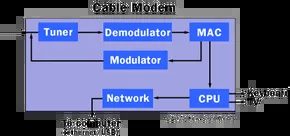
The hidden middleman
MAC is more than just a passive bridge. It sits between the upstream and downstream traffic of the cable modem and handles the handshake between hardware reality and software logic. Every network device has one, but a cable modem’s job is even more difficult. It handles asymmetric data flows, noise margins, and timing quirks that standard NICs can’t handle. The load is so heavy that MAC rarely does all the work itself.
Instead, the functions spill over. Some tasks are sent to the modem’s own internal processor. Others are offloaded to the user’s system processor. Because of this distribution, cable connections feels different than DSL or fiber. The handshake is messy. The MAC manages the chaos.
Why offload to the host CPU?
You might wonder why the modem can’t handle all this. Simple: cost and heat. Building separate chips for each protocol layer is expensive. The small plastic box on the wall also produces more heat. By moving some of the MAC logic to the user’s computer, manufacturers can save money and keep modems cool. The trade-off? Each time a connection is negotiated, a small load is placed on the CPU.
Not a standard NIC
Standard network cards (NICs) require a relatively stable environment. Send a frame. Wait for ACK. It continues. Cable Ethernet is different. The media is shared. Multiple users compete for the same pipeline. The MAC must coordinate access, prevent collisions, and manage bandwidth allocation in real time. It’s not just about passing on information. It’s managing traffic.
This complexity means that cable modem MACs are smarter. It understands DOCSIS standards. It knows how to prioritize video streaming over email. It handles the upstream burst transmission and makes cable internet unique. Without this intelligence, connections can be slow, unstable or non-existent.
This is where the line between hardware and software becomes blurred. Although the MAC protocol stack is in firmware, it usually requires raw processing power to operate. So you can see that the MAC related tasks are split between the modem’s silicon and the PC core. This is a joint effort. One handles the physics. The other handles the policy.
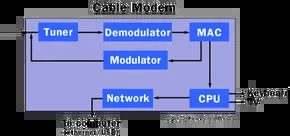
The role of the microprocessor varies depending on the architecture. Some cable modems are built to act as standalone gateways. Others are designed to connect to larger computer systems. Even in the latter case, the internal chip handles most of the media access control (MAC) functions. Shares the load with a separate MAC module. This division of labor maintains the efficiency of the system.
If the only device you need to access the Internet is a modem, the dynamic changes completely. This is where the microprocessor picks up the slack. Take on more MAC workloads. This is necessary because you don’t have a host to help you. Motorola’s PowerPC processors are a popular choice for designers in both cases. If the modem works independently, it is powerful enough to handle the additional load.
Cable Modem Termination System (CMTS)
The CMTS is the front end of the cable network. It acts as a bridge between cable infrastructure and the wider Internet. Modems communicate with this central system to negotiate bandwidth and manage data flow. Understanding how the microprocessor interacts with the CMTS is the key to solving connectivity problems. If the modem cannot handle the MAC commands from the CMTS correctly, the connection will fail. Therefore, processor power is very important.
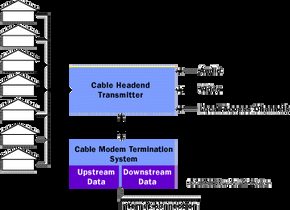

Think of a cable modem terminal system (CMTS) as a heavy lifter that acts as the hub of your cable company. It handles the heavy lifting that a DSLAM handles, which handles the phone line internet, but runs on a coaxial cable infrastructure. A CMTS receives a random mix of traffic from tens or hundreds of users on a single channel and routes it to an Internet Service Provider (ISP). Without this, your data cannot be transferred to the global network.
The cable provider owns or leases space to third-party Internet service providers in the central unit. Here you’ll find servers that handle boring but important things like accounting, logging, and a Dynamic Host Configuration Protocol (DHCP) server. These DHCP servers are very important because they assign and manage IP addresses for all the devices in the cable system. It also uses a control server for CableLabs certified cable modems that conform to DOCSIS standards. DOCSIS, formerly known as the Data over Cable Services Interface specification, remains the primary rulebook for cable Internet operations in the United States.
How data moves upstream and downstream
Downstream traffic behaves like a broadcast. Like Ethernet, data flows from the CMTS to all connected users at the same time. The devices in the home are responsible for filtering that stream and determining which packets are meant for it and which packets can be ignored.
Upstream is different. Data is only transferred from the modem to the CMTS. Other neighbors on the same line cannot see your information at all. To solve this problem, the narrow upstream bandwidth is divided into small time slots measured in milliseconds. Each user has a specific window for sending “bursts” of data. This time-sharing method is ideal for most things you do online, such as short commands, queries, and address requests.
Bandwidth bottleneck
The CMTS can handle up to 1000 users on a single 6 MHz channel. This channel offers a total of 30-40 megabits per second (Mbps). While this is much faster than an old-fashioned dial-up connection, it reveals a fundamental flaw in the cable Internet architecture. The whole community shares a 30-40 Mbit/s pipe.
If you connect for the first time during peak times, you may have almost full bandwidth available. However, as more users log in, especially those streaming 4K video or downloading large files, the available bandwidth decreases. Therefore, during busy periods, the performance may drop significantly below the theoretical maximum. The solution is not magic. It’s infrastructure. Cable companies can alleviate this problem by adding new channels and splitting the user base across them, but this requires capital investment and time.
Distance doesn’t matter here
Unlike ADSL, whose performance decreases with distance from the central office, cable modem performance is independent of distance. Digital cable television systems are designed to provide a consistent quality signal to every home. The burst modulator of the upstream cable modem is adjusted according to the distance from the head-end. It adjusts its signal strength to ensure accurate transmission whether you are three houses away or three miles away.
Frequently asked questions
What is a cable modem in simple terms?
A device that connects your computer to the Internet using the same coaxial cable lines as cable TV.
What is a cable modem used for?
It provides high-speed Internet access to homes and small businesses by converting digital signals from computers into signals compatible with coaxial cable networks.
More Great Links
- Related Articles : How modems work, how DSL works, how Ethernet works, how home networks work
- Guide : Navas Cable Modem/DSL Tuning Guide, Cable-Modems.org: What’s Inside a Modem?
- Tools : Internet Speed Test, Cable/DSL Speed Patches
- News : Cable Datacom News, CableWorld Magazine


