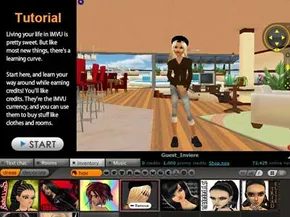
Signing up for IMVU is as frictionless as it gets for a 3D social platform. You don’t need to jump through hoops before installing the client. Head to the main website, click “Sign Up,” and pick a handle. The setup forces you to choose a gender and select from ten pre-dressed starter avatars. You’ll also dump in some basic data like your email and birthday. Once that’s done, the installer downloads automatically.
Avatar Customization and Controls
After the installation finishes, log in. IMVU forces a tutorial on you, which is actually helpful. It walks you through the basics of customization. You can swap out clothes, change hair color, and add accessories. There are plenty of free options if you aren’t ready to spend money.
The tutorial also covers the physics of your avatar. You can toggle moods. Make your character sad. Watch them do a backflip. It’s silly but functional. Movement is instant. Click a seat icon to sit. Click anywhere else to teleport there. The room feels less like a static image and more like a playground.
Chatting and Social Features
This is a chat client first. The 3D visuals are the wrapper. Hit the random chat button to get paired with a stranger. You can filter these connections by age range or gender if you want to be specific. If you have friends already on the platform, add them to your buddy list.
The text chat works normally, but there is a visual twist. Avatars display speech balloons above their heads. It adds a layer of context to the text. You can interact physically with others too. Shake hands. High five. If another user is in your room, you can stream music. We will get to the economics of buying tracks later.
Navigating Public Rooms
You enter rooms to hang out. There are thousands of them. Themes range from vampire castles to hospitals. They come with themed furniture, decorations, and soundscapes. Capacity is usually capped at ten avatars. This keeps the performance manageable.
These rooms are user-created. That means they have rules. Some are female-only. Others ban accessories like pets or wings because those assets hog bandwidth and slow down rendering. You can also join groups and participate in forums outside the rooms themselves.
The Credit Economy
Getting the most out of IMVU requires understanding its economy.