It started with a simple idea: share files for free.
Millions of users flocked to Napster in the early 2000s. They traded MP3s like trading cards. The music industry panicked. Copyright holders didn’t care about the convenience. They cared about lost revenue. A lawsuit forced the original Napster to shut down in 2003.
But you can’t un-invent a technology.
The genie was out. Users wanted peer-to-peer (P2P) file-sharing. They just needed a new place to find it.
Decentralization and the Gnutella Protocol
The answer wasn’t another centralized server. It was a network of peers.
Enter Gnutella.
Unlike Napster, Gnutella has no central hub. There is no server listing who has what song. It’s a protocol. A set of rules. Individual computers talk directly to each other. They exchange queries and responses without a middleman.
This structure makes it harder to kill. Take down one node, and the network shrinks. It doesn’t vanish. It adapts.
Gnutella isn’t a website. It’s not a download from a single vendor. It’s the underlying architecture for many popular clients.
LimeWire Takes the Stage
If Gnutella is the road, LimeWire is the car most people drove.
By late 2007, LimeWire was installed on 18 percent of Windows PCs globally. That’s nearly one in five machines. The number is staggering for a file-sharing client.
But popularity doesn’t equal legality.
LimeWire faced the same storm that sunk Napster. The music industry argued the software enabled piracy. They pointed to the ease of downloading copyrighted music and video.
LimeWire fought back. They claimed they were just a tool. Like a hammer, they argued, they didn’t care if you built a house or broke a window. The software supported legal sharing of non-copyrighted files.
The legal battle dragged on.
The Pending Case
In August 2006, the recording industry sued LimeWire. The charges? Enabling and promoting Internet piracy.
The company insisted it wasn’t promoting illegal acts. They added warnings. They tried to educate users.
The case remained pending for years. The courts had to decide if a tool is liable for how its users misuse it.
What’s Next?
We’re going to look under the hood. We’ll cover the basics of installing LimeWire. We’ll look at advanced features like LimeWire Pro. We’ll talk about troubleshooting.
And we’ll finally answer the burning question on everyone’s mind.
Is LimeWire actually legal?

LimeWire isn’t just an old-school P2P relic. It’s a gateway to the Gnutella network, a decentralized system where you share files directly with other users rather than going through a central server. If you’re setting it up on your PC, the process is straightforward. But there are hurdles. Copyright checks. Firewall blocks. License warnings. You need to navigate them all if you want to download music or documents.
Getting the Installer
First, you go to the LimeWire website. You have two choices for the installer.
- LimeWire BASIC : It’s free.
- LimeWire Pro : It costs $21.95.
The difference matters. Pro users get features that basic users don’t. But before you even get to that choice, there’s a gatekeeper. The site asks if you plan to use LimeWire for “copyright infringement.”
If you say yes, you’re blocked. No download. Period.
You have to agree to use it legally. Click the right button. Download the installer file.
The Installation Process
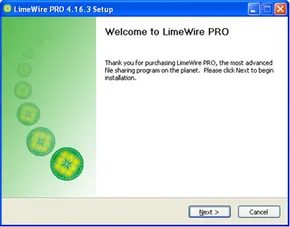
Double-click that file. The Installer Wizard launches. It’s not complicated. It asks where you want to put LimeWire on your hard drive. Pick a folder. Follow the prompts.
Once the files are unpacked, the Setup Wizard takes over. This is where it gets specific to your system.
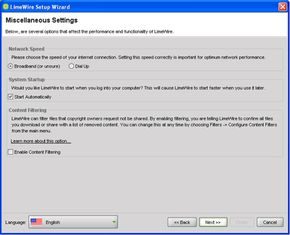
It asks which folders you want to share. You can leave it empty. Or you can tell it to scan your entire hard drive for media files. That means everything you own becomes visible to the network. Choose carefully.
Then, the firewall.
LimeWire needs permission to punch a hole through your firewall. Both the one on your PC and any on your local network. If you say no, the download speeds will tank or connections will fail entirely. Allow it.
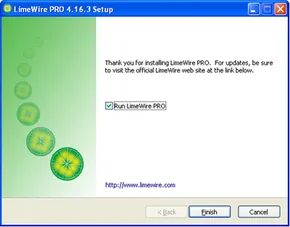
Now the installation is done.
Launching and Searching
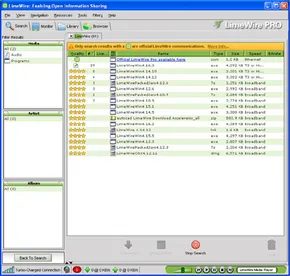
Launch the app. It opens to the Search Tab by default. It’s always there. Top left corner.
You see categories.
- Audio
- Images
- Video
- Documents
- Programs
- All Types
Click one. The window below changes. Custom fields appear.
If you clicked Audio, you can search by song title. Artist. Album. Genre. License type.
Want to go deeper? Click More Search Options. Now you’re looking at track numbers. Song length. Specific metadata.
Not sure what’s out there?
Look at the bottom left. There’s a button that says What’s New.
Click it. It shows you the latest files added to the Gnutella network. It’s the best way to see what’s fresh. What’s popular. You don’t have to guess. The network tells you.
Press Search.
The main window fills up. It might take a few minutes. Depends on your connection speed. The results aren’t random. They’re sorted by popularity.
Most popular files have more copies available. That means faster download speeds. Least popular files have fewer copies. Slower speeds.
Downloading and Managing Files
Find a file. Double-click it. The download starts.
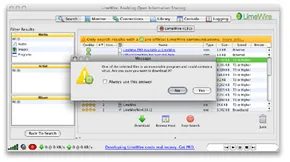
Watch for a warning. If LimeWire can’t find a license for that file, it pauses. It asks if you want to cancel. Or proceed without a license.
It’s your call.
If you proceed, the file shows up in the Downloads window at the bottom of the screen. You see a progress bar. It shows the percentage. It shows how many hosts are sending you data.
When it finishes, the file moves to your library.
Click the Library Tab at the top.
On the left, click Saved Files. All your downloaded content is here. Subfolders break it down by type. Audio. Video. Etc.
Double-click a file. It jumps to the Playlist at the bottom.
Use the controls in the bottom right corner. Pause. Stop. Play.
This works for audio. What about other files? They open in whatever software is associated with them. A PDF opens in your reader. A video file opens in your media player.
The Advanced Side
This is just the surface. The basic interface handles the heavy lifting for most users. But if you paid for the upgrade, there’s more.
Other Features and LimeWire Pro

Managing Connections and Monitoring Traffic
You need to know who you’re talking to. Open the View menu at the top. Click Show/Hide. Select Connections. This panel lists every computer on the Gnutella Network your client is currently shaking hands with. You can drop a connection or browse that specific machine’s shared folders right from there.
Switch to the Monitor tab. This is where the action happens. You will see an uploads section at the bottom. It tracks every file leaving your shared folder. If someone is leaching data you don’t want to give up, click Kill Upload. It cuts the transfer immediately. Above that, watch the Incoming Searches box. It displays the most recent keywords people on the network are typing in. You can watch the trends in real time.
Chat and Privacy Controls
You can talk to other users. Go to the Connections tab. Pick a host. Click the Browse Host button. Right-click any file on their drive. Choose Chat with Host. You can also right-click a file in your own search results to start a conversation with its owner.
Privacy is handled in the Filters menu. Open Configure Content Filters. Check Enable Content Filters. LimeWire will cross-reference your downloads and uploads against a copyright list provided by the entertainment industry. If a file matches, it gets filtered out of your results.
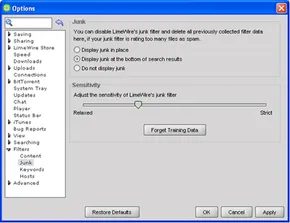
The Filtering menu has more granular controls. Under Junk, you can boost sensitivity. You can hide junk files entirely or just push them to the bottom of the list. Keywords let you block specific terms. Check boxes exist to filter adult content and virus-prone formats like .html, .vbs, .wmv, and .asf. The Host option allows you to ban specific IP addresses. They won’t be able to send or receive queries from your machine.
Integration and Upgrades
LimeWire now integrates with iTunes. Download a song. It appears in your iTunes library automatically. No need to restart the app.
There is a paid version. LimeWire Pro costs $21.95. It is a one-time charge. The upgrade promises 66 percent more search results per query. Better connections mean faster downloads. Pro users also get free tech support and free updates for six months. Regular users are on their own. They rely on message boards.
Troubleshooting Common Issues
Problems happen. Here are the basics.
- No Results? Check your connection status. Ensure your firewall isn’t blocking P2P ports.
- Slow Downloads? You might have few connections. Add more hosts in the Connections tab.
- Uploads Stalled? Check the Monitor tab. Kill and restart the transfer.
- iTunes Not Syncing? Verify the integration settings in preferences.
The network changes. The software updates. Users adapt.

Troubleshooting Connectivity Errors
Most users hit a wall when LimeWire refuses to talk to the Gnutella Network. Before you panic, check the status indicators. Look at the bottom left corner of the interface. Those connectivity bars tell the truth. Three green bars mean you are good. One green bar? You are effectively offline.
Check the Connections tab too. If every single line says “connecting,” you have a problem. Run a search. If nothing comes up after a full minute, the link is broken. Also, watch for that icon next to the bars—a globe behind a brick wall. That is a firewall blocking you. It is not always fatal for LimeWire, but it is a red flag you should not ignore.
Fixing these connection drops requires a specific order of operations. Start with the basics. Open a browser. Is the internet working? If not, unplug your modem. Restart your routers. Wait for the lights to stabilize. If you are still offline, call your ISP. Once the web works again, reopen LimeWire and try searching.
If the internet is fine, restart the app. Quit and relaunch it. Or go to File > Disconnect, then Connect. This forces a fresh handshake with the network.
Security software is often the culprit. Norton, McAfee, and ZoneAlarm love to block peer-to-peer traffic. You need to open your firewall settings and add LimeWire as an exception. Hardware firewalls on routers are next on the list.
You need to know which port LimeWire uses to talk. Go to Options > Advanced > Firewall Config. Note the “Listen on Port” number. Go into your router’s firewall settings and assign that exact port to LimeWire. If you are on a corporate network, talk to your sysadmin. Many ISPs and offices actively block P2P programs.
Navigating Legal Risks
For users who only want to download legal content, filtering is your best friend. LimeWire has a list of copyrighted files. You can filter them out. It is not perfect, but it helps. A better strategy is searching only for files with open licenses. When looking for music, use the options to show only Creative Commons or Weedshare tracks. This keeps you in the clear legally.
Why Downloads Feel Glacial
Slow downloads are the second biggest complaint. The reality is harsh. Your download speed is capped by the slowest link in the chain. If you have gigabit broadband but the uploader has dial-up, you are stuck at dial-up speeds. Downloading multiple files at once also strains bandwidth. The host might be uploading to ten other people simultaneously.
The solution is simple but requires discipline. Pick files from hosts with high bandwidth. Ideally, pick hosts with multiple sources. Gnutella networks are designed to grab pieces of a file from many different computers at once. Your computer reassembles them. If you download a song from eight high-speed hosts, it should take less than 30 seconds.
If that still feels too slow, upgrade to LimeWire Pro. It promises faster rates. Or try third-party apps that claim similar speed boosts. It is a gamble, but sometimes necessary.
Is LimeWire Legal?

LimeWire itself is not illegal. The code doesn’t break any laws just by existing. The problem is what happens when you run it. Downloading copyrighted material? That is definitely illegal. Distributing it? Even worse. The software company’s defense is simple. They argue their product is just a tool.
Think about a hammer. You can use it to build a house. You can also use it to smash a window and steal the TV. The hardware store doesn’t get blamed when you use the hammer to commit a crime. The liability falls on the user. Right?
That logic held up for a while. Then the music industry pushed back hard.
The Lawsuit and the Price of Piracy
In August 2006, major record labels sued LimeWire. They weren’t just asking for an apology. They demanded $150,000 for every single song distributed without permission. That is a staggering number. It shows how aggressively the industry was fighting back against peer-to-peer networks.
LimeWire wasn’t alone in the crosshairs. Just a week before the lawsuit, the makers of Kazaa settled with the music industry. The price tag? $115 million. That settlement came with a condition. Kazaa had to install special filters in its software to block copyrighted content.
As of that moment, LimeWire’s case was still pending. But the threat was real.
Users Are Still on the Hook
Even if LimeWire walks away from the lawsuit unscathed, the people using it are not safe. The recording industry has been targeting individuals for years. Since September 2003, the RIAA has sued more than 20,000 people for alleged illegal file-sharing.
The process is straightforward and scary. You get a letter from the RIAA’s lawyers. It includes a settlement offer. The goal is to avoid going to court. They identify you by your IP address. If you ignore the offer, they threaten to sue you by name. The amount jumps significantly.
Typical settlements range between $3,000 and $11,000. Refuse to pay? The legal bills and potential damages go up. It’s a high-pressure tactic designed to make you pay up rather than fight a powerful industry group in court.
The Cat and Mouse Game Never Ends
Despite the legal pressure on software companies and individual users, file-sharing isn’t dying. The number of active users worldwide keeps growing. If LimeWire gets shut down tomorrow, dozens of other programs are ready to take its place.
The cycle continues. New tools emerge. The law catches up. Users adapt. The software remains legal. The act of sharing often does not.
Is LimeWire safe?

The Federal Trade Commission didn’t mince words. They issued a stark consumer alert about peer-to-peer file-sharing. The message? It’s risky. Specifically, when it comes to software like LimeWire, two things stand out.
First, you might accidentally share files you meant to keep private. Second, you could unwittingly download copyright material, pornography, or viruses.
LimeWire’s response wasn’t to shut down. It was to educate. The company offered a roadmap for protecting yourself and your children from those exact pitfalls. Here is how you navigate the risks.
Controlling Shared Folders
The biggest fear is exposure. You don’t want strangers poking around your hard drive. LimeWire gives you control over which folders and files are visible on the Gnutella Network.
If you aren’t sure what’s currently exposed, go to the Library tab. Look to the left side and click on the Shared Files folder. Anything listed there is public.
If you spot a folder or file you don’t want to share, hit the delete button. It removes it from the sharing queue. Simple. Effective.
Filtering Out Adult Content
Pornography isn’t the only risk, but it’s a common concern for parents. LimeWire addresses this with a built-in safeguard.
Go to the Filters menu. Choose Configure Content Filters. Click the Keywords button. There, you will find a checkbox labeled Ignore Adult Content.
Checking this box activates what LimeWire calls the Family Filter. It scans incoming data and discards files that may contain adult content. It’s not perfect, but it adds a layer of protection.
Avoiding Spyware and Viruses
Here is the tricky part. LimeWire itself claims to be spyware-free. The company states it does not bundle third-party advertising software with its product.
However, the files you download might not be clean. LimeWire warns against downloading files with specific extensions. These are common vectors for malware:
.exe.vbs.lnk.bat.sys.com
These file types can contain viruses or spyware. You can automate the defense. In the content filter settings, check the box to remove all such files from your search results. Let the software do the heavy lifting.
Managing Startup and Shutdown
The FTC also recommended shutting down file-sharing programs when not in use. It’s a basic security practice that many ignore.
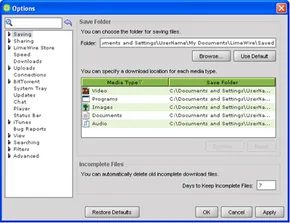
LimeWire lets you customize this behavior. Go to Tools > Options (or Preferences on Mac). Click on the System Tray tab.
Here you can choose default shutdown behavior. You have two options:
1. Shutdown immediately.
2. Wait until all active downloads are done.
Pick the one that fits your workflow.
You can also control startup. In the same menu, under the Advanced tab, there is a section for System Startup. Decide whether you want LimeWire to launch automatically when you turn on your computer. Probably not. But it’s your call.
The Future of LimeWire
That was the safety checklist. It covered the FTC’s concerns and the software’s built-in defenses. But what happens next?
The landscape of file-sharing was shifting. Users were becoming more cautious. Regulations were tightening. The tools available were evolving.
Where did LimeWire go from here? The safety features were just the foundation. The real story was about survival in a changing digital ecosystem. The next steps involved adapting to a world that was getting less tolerant of unchecked data exchange. The question wasn
The parent company behind the infamous file-sharing giant, LimeWire LLC, is trying to stretch its brand beyond just peer-to-peer distribution. They want to capitalize on whatever residual fame remains and expand the reach of the LimeWire identity into new digital territories.
The birth of LimeSpot
The next phase involves LimeSpot, a new online social network currently in beta. It looks familiar. You create a personal profile. You host a blog. You write wikis. You connect with other users as “friends.” It is essentially another attempt to ride the social media wave, leveraging the existing user base of the parent company.
Establishing a legal online store could be a way to stay alive if LimeWire loses its copyright infringement lawsuit with the RIAA.
Building a legal storefront
Plans are in motion for an online store. It is not operational yet, but the vision is clear. Users would be able to buy songs directly from LimeWire search results. There will also be a standalone LimeWire Store website.
To make this work, they have secured licensing deals with two independent music distributors: IRIS Distribution and Nettwerk Productions. This is a significant shift. Moving from unregulated sharing to licensed commerce.
The RIAA threat
Why rush this? The legal pressure is real. LimeWire is in a copyright infringement lawsuit with the Recording Industry Association of America (RIAA). If they lose, the company could be finished. A legal online store offers a lifeline. It provides a legitimate revenue stream and a legal footprint that stands up in court better than pure piracy.
For now, the focus remains on the core product. LimeWire is still concentrating on improving its peer-to-peer service. They are adding features like BitTorrent support. The social network and the store are the future. The P2P engine is the present.
We hope this helps you understand how the software worked and the controversy surrounding peer-to-peer file-sharing. If you want to dig deeper into the mechanics of Gnutella or related topics, there are more links available on the next page.
Frequently Answered Questions
Does LimeWire still exist?
No. LimeWire does not exist as a company anymore. The last version of the LimeWire software was released in 2010. The company folded, the lawsuits continued, and the brand faded into tech history.
Related Articles
- How Laptops Work
- How Online Social Networks Work
- How Social Networks Work
- How Net Generation Students Work
- What are copyrights and patents?
More Links
- LimeWire
- Legal File-Sharing with LimeWire