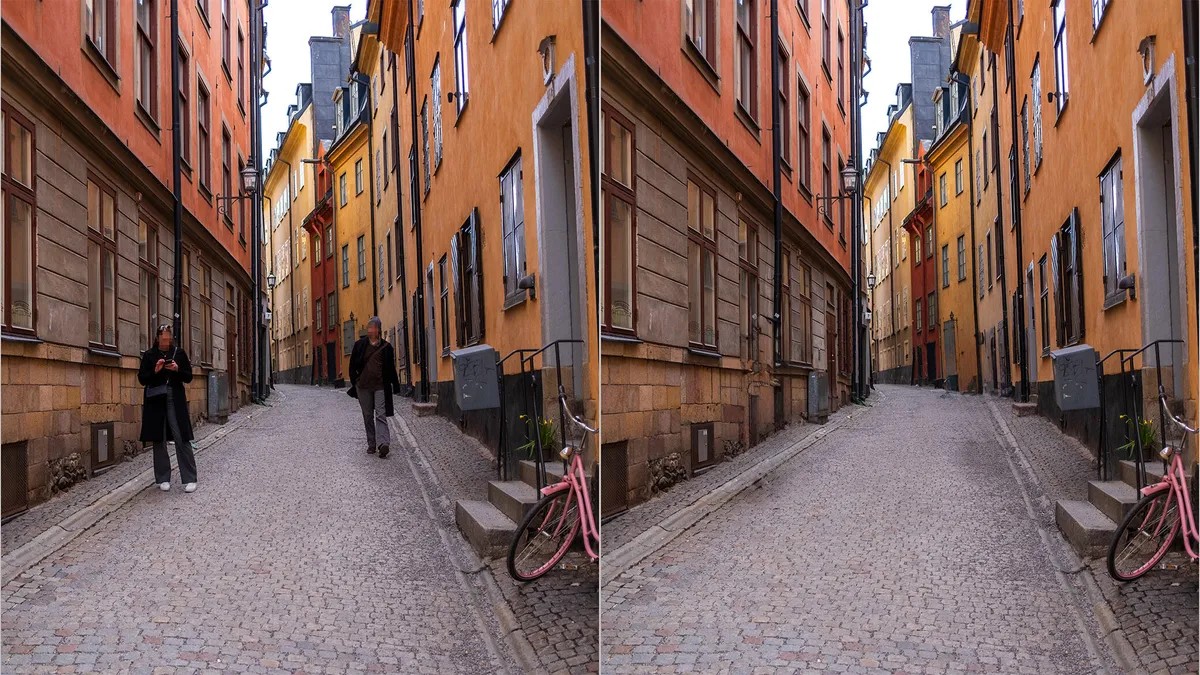
Apple has introduced a powerful new feature called “Clean Up” within its Photos app, designed to remove distracting elements from your images with unprecedented ease. Utilizing Apple Intelligence, this tool allows users to eliminate unwanted people, objects, or blemishes from photos on iPhones, iPads, and Macs. While the results aren’t always perfect, the potential for quick, effective editing is significant—and here’s how it works.
The Problem of Imperfect Photos
Real-world photos rarely align perfectly. A great group shot can be ruined by a photobomber, a distracting vehicle, or simply an unwanted object in the background. Previously, such fixes required complex editing skills and specialized software. Now, Apple’s Clean Up tool aims to streamline this process, making it accessible to everyone. This is a response to the growing demand for effortless content creation, as users increasingly rely on smartphones for both capturing and editing images.
How Clean Up Works: Generative AI in Action
Unlike traditional retouching tools that merely copy surrounding pixels, Clean Up leverages generative AI. This means the software analyzes the entire scene, then creates new content to fill the space where an element has been removed. For example, if you delete a person standing in front of a tree, the AI will generate foliage and texture that blends with the background, even accounting for lighting and shadows. This is a leap forward from simply patching over imperfections; it’s about intelligently reconstructing the image.
The tool operates in two modes:
1. Automatic Suggestions: The app identifies potential distractions (people, vehicles) and highlights them for removal.
2. Manual Selection: Users can draw a circle around any unwanted element to trigger the AI-powered cleanup.
Compatibility and System Requirements
Clean Up is part of Apple Intelligence, meaning it’s only available on compatible devices:
iPhones: Running iOS 18.1 or later.
iPads: With M-series processors (and iPad mini with A17 Pro) running iPadOS 18.1 or later.
Macs: * With M-series processors running MacOS Sequoia 15.1 or later.
This restricted access reflects Apple’s phased rollout of its AI features, prioritizing performance and user experience on supported hardware.
What Works Best: Focusing Your Efforts
Testing reveals that Clean Up excels in specific scenarios:
Small Distractions: Litter, dust, or minor blemishes are removed almost flawlessly.
Background Textures: Areas like foliage, grass, or stone replicate well due to the AI’s ability to generate natural patterns.
Lens Flare: Minor light distortions are easily corrected.
Sparse Detail: Areas with minimal complexity yield the most consistent results.
However, the tool struggles with large areas, busy scenes with defined features (like removing a person from a crowded landmark), or elements with complex reflections and shadows. The key is to avoid overambitious edits; start small and refine as needed.
The Future of AI-Powered Editing
While Clean Up shows promise, it’s still under development. Future improvements should focus on refining the generated content, providing multiple repair options (like Adobe Lightroom), and addressing the current lack of iterative editing. As AI continues to evolve, tools like Clean Up will become even more powerful, blurring the lines between photography and digital creation.
Apple’s Clean Up tool represents a significant step toward more intuitive and accessible photo editing. Despite its current limitations, it sets the stage for a future where AI seamlessly enhances our visual world.