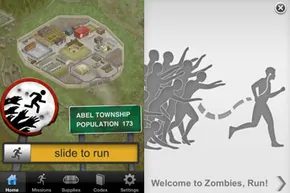
The threat is closing in. Brunswick needs a warning. The zombies are ahead of me, cutting off the escape route. I have to sprint. My lungs burn. My legs scream. I am exhausted.
Except I am not. I am sitting on my couch. The “horde” is a script. The warning is code. The exhaustion is just the result of a real workout layered over a fictional apocalypse by the app Zombies, Run!. I love the gamification. It makes the miles feel like a mission. But I’m also training for a half marathon. Fiction doesn’t shave seconds off my time. Reality does. And reality requires data.
Most runners rely on GPS. It’s the gold standard for outdoor tracking. It tells you exactly how far you’ve gone and how fast you moved. But what happens when you can’t get outside? Rain. Snow. A busy street. Or simply, like in my case, the desire to stay indoors. When GPS is dead, apps switch to the accelerometer.
How Accelerometers Track Movement Without Satellite Data
Your phone doesn’t have a crystal ball. It doesn’t know where you are on a map. But it does have an accelerometer. This tiny sensor measures changes in velocity. It detects movement in three dimensions: up/down, left/right, forward/back.
When you run, your body bounces. Every footstrike sends a shockwave through the device. The accelerometer counts these impacts. It analyzes the pattern of the bounces. It uses algorithms to estimate stride length and cadence. From that, it calculates distance.
This is how indoor tracking works. It’s not magic. It’s math based on physics. And it’s flawed.
Why Indoor Tracking Is Inherently Less Accurate
GPS locks onto satellites. It’s precise. Accelerometers drift. They accumulate error over time. Think of it like a pedometer on steroids. If you take a step, it counts it. If you walk in place for ten minutes, it might think you’ve gone a mile. It can’t tell if you’re running up a hill or down a flight of stairs. It just feels the shake.
Studies have shown that indoor tracking can be off by 10% to 20% or more. The longer your run, the worse it gets. The algorithm assumes a consistent stride. But your stride changes. You get tired. You adjust your form. The app doesn’t know. It just keeps counting.
Which Apps Handle Indoor Tracking Better?
Not all apps are created equal. Some use more sophisticated algorithms. Some combine accelerometer data with heart rate monitoring to refine their estimates. Others just count steps and multiply by a fixed stride length. That’s the easiest way to fail.
Apps like Strava, Nike Run Club, and Garmin Connect have improved their indoor modes over the years. They often ask you to input your height or previous outdoor runs to calibrate the stride length. This helps. But it’s still an estimate.
Zombies, Run! focuses on narrative. Its tracking is secondary to the story. If you need precise data for training, you might want to cross-check with a dedicated running watch. Those devices have built-in accelerometers too, but they’re often calibrated differently. They’re designed for this specific task.

Accelerometers in your pocket are essentially fancy motion detectors. They measure changes in direction and velocity. When you run, they track your acceleration into each stride and the slight deceleration after your foot hits the ground. It’s constant, relentless data.
But here is the catch. While GPS makes outdoor distance tracking trivial, treadmill distance accuracy using phone sensors is a mess. There are hundreds of running apps on iOS and Android. Very few handle indoor tracking well. Why? Because calculating imaginary distance without a satellite signal is hard.
Alex Macmillan, lead developer for Zombies, Run!, points out the core issue. Accelerometer data is noisy. You have to distinguish between the runner’s actual motion and the phone rattling around in a pocket. It’s not just about movement. It’s about isolating the signal from the chaos.
Then there is the data load. To get usable results, you must sample the accelerometer frequently. This means your code has to process calculations between every single sample. It requires speed. It requires efficiency. Add to that the fact that you aren’t actually going anywhere, and you see why developers struggle.
The Pedometer Trap
The easy solution? Treat the accelerometer like a pedometer. Count steps. Multiply by stride length. Done.
It sounds simple. It is also wildly inaccurate.
This method requires input. You must tell the app your height and weight. The app uses this to estimate stride length. But what if you have long legs relative to your height? A person with the same height as you might have a shorter stride. The math fails immediately.
Some apps try to fix this. They ask you to run a known distance. Maybe a mile. Then you tell the app how far you went. The app adjusts the stride estimate. Nike+ GPS allows a “calibrate run.” You input the distance after the fact. It recalculates for next time.
But this introduces new variables.
What if you use run/walk intervals? Your walking stride is shorter than your running stride. The app doesn’t know which one you’re doing unless you tell it. What if your calibration run was faster than your normal pace? Gait varies. Strides vary.
“If the stride length measurement is wrong by even a small amount, the total estimated distance can be wrong by a long way.”
Macmillan’s warning holds true. If you’ve seen a disparity between your app’s distance and the treadmill’s display, you’ve seen this error in action. It’s a problem for anyone training for a half marathon or marathon. Precision matters.
Macmillan’s team is working on a new model. They aren’t trying to measure absolute speed. They are measuring relative change. This approach ignores height and weight. It ignores stride length. It focuses on how speed changes relative to itself. Whether this solves the problem remains to be seen.
The Treadmill Isn’t Perfect Either
Why not just trust the machine? Treadmills count belt revolutions. It seems foolproof. It isn’t.
Search for “treadmill distance accuracy” and you’ll find complaints everywhere. A small miscalculation in belt length compounds over thousands of rotations. In a 5K run, that tiny error becomes a significant distance gap. The machine lies too.
So you are stuck between a noisy sensor and a potentially inaccurate machine. What can you do?
Customize Your Experience for Best Results
You can’t fix the hardware. You can only optimize the input. If your app allows calibration, use it. Do it consistently. Use the same warm-up pace for calibration runs to keep variables stable.
Be wary of apps that claim perfect accuracy without user input. If an app asks for height and weight but nothing else, treat its distance numbers as estimates. Rough ones.
“By only needing to measure the relative change in a person’s speed, rather than attempting to accurately estimate the runner’s actual speed, we believe we can create a model that works for a very wide range of runners.”
This philosophy might be the future of indoor tracking. Until then, rely on effort. Rely on time. Trust the burn in your legs more than the number on your screen.
The gap between perceived effort and digital readouts is where the real data lives. It’s messy. It’s human. And it’s the only thing you can truly control.
Calibrating Indoor Running Apps for Accuracy
Getting precise data from a treadmill app isn’t automatic. You have to work for it.
The first hurdle is finding software that actually lets you input calibration data. Many popular fitness apps don’t support this feature at all. If your current choice doesn’t offer it, you’re stuck with an estimate. If you do find one that allows manual input, here is how you tighten up that accuracy.
Pinpoint Your Distance
You need a known variable.
Find a location where the distance is 100 percent certain. A regulation athletic track is the gold standard here. It’s marked. It’s measured.
Don’t have access to a track? No problem. Go outside. Use a GPS device or a phone in outdoor mode to map a route. Pick something simple. One mile. One kilometer. Mark the exact start and stop points. Write them down. You need these coordinates to be exact.
Switch Your App to Indoor Mode
This step is non-negotiable.
Whether you are on a treadmill or just walking around your living room to calibrate, you must switch your app to “indoor” mode. Why? Because this tells the software to ignore GPS signals. It forces the phone to rely on the accelerometer. GPS doesn’t work well indoors. The accelerometer does. It’s the only sensor listening to your steps.
Execute the Calibration Run
Now, go for a run.
Start at your marked beginning point. Stop exactly where you planned. If you use interval training (run/walk), stick to your normal ratio. Do not change your pace or pattern for the sake of the test.
Crucially, make the distance as long as possible. More data points mean a more stable calculation. A short hop won’t give the app enough information to build a reliable model.
Input the Data
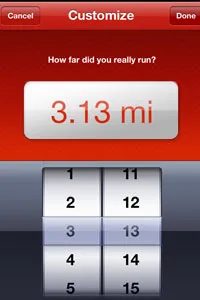
When you finish, enter the distance.
The app takes that number. It divides it by the step count recorded by the accelerometer. The result is your average stride length.
This is why your interval timing matters. If you run and walk during the test, the app calculates an average that includes both motions. If you only run during the calibration but walk during your actual workout, the data is useless. You’re comparing apples to oranges. The stride length changes between running and walking. The app needs to know that.
Verify the Results
Run the course again.
Keep the app in indoor mode. Check the distance.
If it’s close, good. If it’s off, don’t panic. Try the whole process again with a longer distance. A larger sample size often corrects small variances.
When to Recalibrate
Your body changes. Your routine changes.
If your weight shifts by more than a few pounds, recalibrate. Losing weight usually means you get faster. Your stride lengthens. Your step frequency changes. If you alter your run-to-walk ratio, that’s another trigger.
The app is guessing. It’s using a formula: steps times stride length. It’s not magic. It’s math based on limited data. You won’t get 100 percent accuracy. That’s impossible with current sensor tech. But you can track progress. You can see trends. You can know if you’re getting faster or slower over time.
That’s the real value. Not the exact meter count. The trend.
Author’s Note: The Accelerometer Mystery
I’ve tested over a dozen running apps. I love the tech, but I also know its limits. None of them are perfectly accurate indoors. The calibration steps help. They bridge the gap between “wild guess” and “educated estimate.”
But if I need exact pace data? I go outside. GPS is better for precision. Sensors are better for convenience. Know the difference.
Related Topics
- How iPhone accelerometers function
- Treadmill running for triathletes
- Technology and weight loss
External Resources
- Zombies, Run!
- iTreadmill
- Nike+ GPS
Sources
- Barański, P., et al. “Dead reckoning navigation – supplementing pedestrian GPS with an accelerometer-based pedometer and an electronic compass.” 2009.
- Cho, Dae-Ki, et al. “AutoGait: A Mobile Platform that Accurately Estimates the Distance Walked.” UCLA, Alcatel-Lucent Bell Labs. 2012.
- Hillrunner. “Treadmill Pace Conversions.”
- Texas Instruments. “Accelerometers and How They Work.”