The 2008 Sichuan earthquake in China killed over 55,000 people. The death toll could have been even higher. Landslides had blocked rivers, creating natural dams that threatened to burst and flood downstream communities. Local officials used text messages to warn residents of the rising waters. They urged people to evacuate immediately. The alerts worked. Lives were saved.
This wasn’t an isolated incident. In January 2008, an unseasonal tornado hit Poplar Grove, Illinois. It flattened four houses. The shockwave in neighboring Winnebago County led to the adoption of a Reverse 911 system. Now, residents there receive alerts via landlines, cell phones, email, and Voice-over Internet Protocol (VoIP) numbers during bad weather or other emergencies.
Loud sirens are disappearing. They are being replaced by digital and Web-based technology. Weather alerts tell us when to head to the shore, board up windows, or just seek shelter. A siren might be the first image that comes to mind, but emergency alerts now use many different communication channels. Internet and wireless technology allow us to receive these warnings as notifications on PCs, smartphones, and mobile devices.
But which method works best? And how do you actually sign up for these alerts?
The Emergency Alert System
The Emergency Alert System (EAS) is the national public warning system in the United States. It replaced the Civil Defense system in the early 1990s. The EAS allows the President to speak to the nation during a national emergency. It also enables local and state authorities to issue weather warnings.
The system works through a chain of command. Broadcasters, cable operators, and satellite providers must relay messages. This happens automatically or manually. The goal is speed. The system can interrupt regular programming to deliver critical information.
Why Digital Matters
The shift from sirens to digital alerts is about reach. Sirens are local. They don’t travel far. Digital alerts can reach people who are not at home. They can reach people who are working, driving, or traveling. This mobility is crucial.
Consider the difference in speed. A siren takes time to build up. Digital alerts arrive instantly on devices that are always with us. This immediacy can mean the difference between life and death.
How to Sign Up
Signing up varies by location. There is no single national portal for all emergency alerts. Local governments manage their own systems. Some use Reverse 911. Others use text message services. Some use email lists.
To find out how to sign up in your area, you need to check with your local emergency management agency. They will tell you which methods they support. If you rely on digital alerts, make sure your phone settings are configured to receive them. Check your carrier settings. Look for government alerts in your phone’s notification preferences.
The Limitations
Digital alerts are not perfect. They require power. They require connectivity. If the network goes down, the alerts stop. This is a significant vulnerability. During major disasters, networks can become congested. Messages may be delayed.
Despite this, the benefits outweigh the drawbacks. The ability to target specific geographic areas with precise information is a game-changer. It reduces panic. It saves resources. It keeps
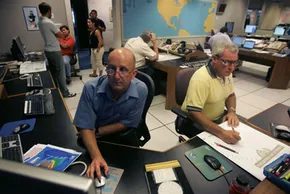
Remember that piercing, jarring tone? The one that stopped traffic and made you drop your coffee? It was the sound of the Emergency Broadcast System (EBS) waking up America. Originally born from Cold War paranoia, it was the president’s direct line to the public during a national crisis. After 1963, the scope widened. State and local officials could use it too.
The Federal Communications Commission (FCC) didn’t mess around. They mandated that every TV and radio station run the attention signal and test script at least once a week. Between 1976 and 1996, the system triggered more than 20,000 times. Most of those weren’t nuclear scares. They were weather alerts.
Why the Emergency Alert System Replaced the EBS
The old analog system was clunky. It was loud, intrusive, and inefficient. In 1997, the FCC decided it was time for a digital overhaul. The EBS became the Emergency Alert System (EAS). The name change reflected a technological shift that changed how alerts were delivered.
The weekly test isn’t a shrill tone anymore. It’s an eight-second digital data signal. AM, FM, broadcast TV stations, and cable systems with over 10,000 subscribers all have to participate. Digital radio and direct broadcast satellite providers are in the mix too.
Digital technology allows the EAS to pack more information into a shorter burst. It can target specific geographic areas with precision. It sends messages faster. Much faster.
How the System Actually Works
Let’s look at a standard bad weather alert. The chain of custody starts with the National Weather Service (NWS). They send the alert via their NOAA Weather Radio (NWR) signal. This signal uses Specific Area Message Encoding (SAME). The coding protocols mirror those of the EAS.
Broadcast stations receive this NWR signal on their EAS equipment. The hardware decodes the data. Then, the broadcaster retransmits the warning. You might see it as scrolling text across the bottom of your TV screen. Or it might interrupt your programming entirely.
State and local officials use the EAS too. The system cooperates with the Federal Emergency Management Administration (FEMA). The FCC ensures that participating services—stations, cable systems, satellite companies—can transmit messages even when unattended. Automation handles the heavy lifting. If a station broadcasts in a different language, the message converts automatically. No human translator needed in the loop.
Dedicated Weather Radios: Still Relevant?
You don’t need a television to stay informed. A dedicated weather radio works independently. These devices pick up continuous watches, warnings, and forecasts from the NWS all-hazards network.
Prices range from $20 to $200. You can find them at electronics and sporting goods stores. The model you choose dictates what features you get. Key options include:
- A tone alarm that wakes you up at night when the audio is muted.
- SAME technology that filters out alerts for areas you don’t care about.
- Battery backup to keep running when the power goes out.
- Vibrations, flashing strobes, and warning lights for the hearing impaired.
It’s not glamorous. It’s a box with a speaker. But it works when the grid fails. It doesn’t rely on a cell tower. It doesn’t need Wi-Fi. It just needs fresh batteries and a clear signal path to the NWR transmitter.
Cell Phone Weather Alerts

Waiting for a flight across the country. Sitting in the stands at a soccer match. You don’t want to miss a thing. But you also don’t want to get caught in a storm without warning.
Checking the weather on your phone is the obvious move. It’s easy. But is it worth the premium price tag? Often, it isn’t.
Developers are building apps that push simple alerts. Some push broader emergency notifications. Media giants like The Weather Channel are in the mix too. They pull data from the National Weather Service via the Emergency Alert System (EAS). They push it to your screen. Even local governments are stepping up.
Prices vary. Availability depends on your carrier. Some services are free. But remember, you still pay your provider for the text. Here is how you can actually get these notifications without overpaying.
Free and Paid Options
The Emergency Email Network is one option. It sends free emails to your cell, wireless device, or PC. The alerts cover homeland security emergencies. Local natural disasters. Severe weather. All you need to do is give them your ZIP code. Your email address. The device you want to hit. You can filter by topic.
The Weather Channel offers its own suite. Free 4CAST text-message alerts are available. They range from severe weather warnings to specific next-day rain predictions. Extreme heat. Extreme cold. Icy precipitation. Snow. They also offer on-demand pollen alerts.
My-Cast from Digital Cyclone takes a different approach. It offers forecasts and maps. It makes your phone beep. This happens when storms approach. Or when lightning strikes nearby. It pulls weather watches and warnings from the National Weather Service.
Cost is $3.99 per month. It works on BlackBerry devices. iPhones. Many other phones. But it is not available on AT&T’s network.
Norfolk Alert is municipal. If you live in Norfolk, Virginia, you can register. Provide a valid email. Choose what you want. Inclement weather. Road closings. Emergency notifications. Alerts go to your home phone. Cell. Email. Other towns offer similar services. Check what is available locally.
WeatherBug Protect from WireFly costs $2.99 a month. It targets BlackBerry devices and other cell phones. It pinpoints your cellular location. It gives alerts for that specific spot. Notifications can be recorded voice. Text. Email. There is also two-way messaging. You can respond. Report back personally on conditions.
Space Weather and What’s Next
If you need alerts for somewhere distant. Check NOAA’s Space Weather Prediction Center. Sign up for free emails. You get alerts about comets. Asteroids. Geomagnetic storms. Radio blackouts. And more.
Wouldn’t it be great if the National Weather Service sent text messages directly to users? That is in the works.
FCC Emergency Text Messaging

Why Text Alerts Are Replacing Broadcast Radio for Emergencies
National Weather Service radio is reliable. It comes straight from the source. But you can’t carry a bulky receiver everywhere. You leave it at home. Your phone is always with you.
Currently, cell providers just rebroadcast EAS signals. It’s not direct. It’s a relay. If warnings came as text, they’d arrive instantly. No matter where you are.
The FCC and FEMA want to fix this. They are building a system. It sends audio, video, and text. To landlines. Websites. Email. And cell phones.
The Commercial Mobile Alert System (CMAS)
In April 2008, the FCC approved the plan. A federal agency creates the alerts. It sends them to mobile carriers. T-Mobile, Verizon, Sprint, Nextel, and AT&T agreed to join. Participation isn’t mandatory. But they said yes.
Users can opt out. You don’t have to receive them.
The alerts trigger for three specific events:
- Disasters threatening health and safety. Like a terrorist attack.
- Natural disasters. Hurricanes. Tornadoes. Earthquakes. Severe storms.
- Amber alerts. Child abductions.
Once the agency is appointed, carriers get ten months. Ten months to meet requirements. One rule stands out. Alerts must be accessible. People with disabilities need distinct vibration cadences. Or sound cues.
When Will It Happen?
The Warning, Alert and Response Network Act passed in October 2006. It mandated this system. Nationwide mobile alerts were expected by 2010. They were late.
We still check NOAA Weather Radio. We still check the Emergency Alert System. But the shift to direct digital alerts changed how we think about safety. It wasn’t just about hearing the siren. It was about knowing before the storm hit.
The infrastructure changed. The speed increased. The reach expanded. But the feeling of being cut off from the source? That lingers.