


If a tree falls in a forest, does it make a sound? Maybe. But if a website vanishes overnight, does its homepage ever really exist? In a digital world that prioritizes the new, history is fragile. Most pages die before they can be remembered. That is why the Wayback Machine matters. It is not just a time machine for the internet; it is a desperate attempt to hold back the tide of digital decay.
The average lifespan of a webpage is roughly 100 days. Mark Graham, the director of the Wayback Machine, highlighted this statistic in a 2016 Entrepreneur article. One hundred days. After that, the content usually disappears. Why does this happen? Site creators move on. Hosting companies go bankrupt. Or simply, the page is replaced with newer data. Without a digital archive, these updates would erase the past entirely.
How the Wayback Machine Got Started
The project was created by Brewster Kahle and Bruce Gilliat. They also founded the Internet Archive, a San Francisco-based nonprofit digital library. The Wayback Machine is a project of this larger institution. It preserves websites, books, audio, video, and software. (They also built Alexa Internet, which tracked web traffic before Amazon bought it.)
They began archiving pages in 1996. They launched the public tool in 2001. The name comes from “The Rocky and Bullwinkle Show.” In the cartoon, the WABAC Machine transported Mr. Peabody and Sherman back through history. The spelling is different, but the intent is the same. You want to see what was there before.
How do you catalog 1.7 billion websites? You use crawlers. These are automated software bots that move across the web. They take snapshots of billions of sites. But automation isn’t enough. Librarians at the Internet Archive manually prioritize sites they deem important. They decide what needs to be saved for future generations.
What the Archive Actually Captures
The crawlers don’t catch everything. Frequency varies. Highly significant sites might be recorded every few hours. Others are logged weeks apart. Most sites aren’t logged at all. So that embarrassing fan page you built in high school? It is likely gone forever. The machine aims to capture important content. Major media headlines. Breaking news.
It also doesn’t recreate the site exactly. You won’t experience it like a browser. The archive may only capture a few images of a few pages. It often fails to preserve content linked to external domains. This is a known limitation. The Wayback Machine provides a glimpse, not a perfect replica.
Using the Wayback Machine
You have seen the 404 error. “Page not found.” It is frustrating. You want to know what was there originally. The archive helps with that.
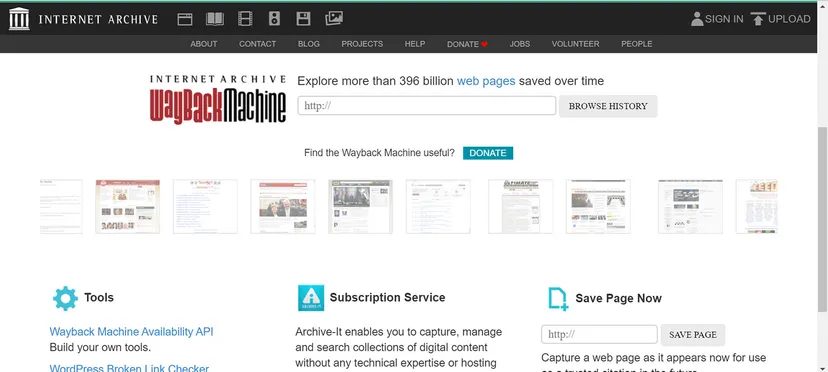
Go to https://archive.org/web/. Type a URL into the “Browse History” bar. Try https://www.howstuffworks.com/ as an example. The results show a chronological bar graph. It displays how many times the site was crawled and saved each year.
This visual data reveals the pulse of a website. Some years show spikes. Others show silence. It tells you how often the internet was looking. How often it stopped to take a picture.
But why do some sites vanish while others survive? Is it luck? Or is it value? The archive prioritizes based on perceived importance. But who decides what is important? The librarians. The crawlers. The algorithms.
There are gaps. Huge ones. Entire eras of the web are missing. Or only partially preserved. You can’t always get the full context. The external links are broken. The stylesheets are gone. The page looks wrong.
Still, it is better than nothing. It is better than silence. The tree falls. The sound fades. But the archive tries to keep the echo.

Navigate past the year selector and you hit a twelve-month calendar. It’s a visual history of survival. Blue squares mean a site was captured successfully. Red means it failed. Click a blue date and the snapshots load. Click the snapshot. You are back in time, viewing an older version of the site.
Sometimes you need to force the issue. The automated crawlers might miss a critical update. You can manually save a page using the “Save Page Now” option. This captures a specific URL instantly. It does not guarantee future crawls. It does not archive the whole site. It just saves that single page.
Content owners have an out. If you want your material kept out of the Wayback Machine, you can exclude it. Send an email to info@archive.org and they will honor the request.
The interface offers more than just web pages. The icons at the top of the homepage open up books, videos, audio recordings, and software. You can download these permanently or borrow them for a set time. Advanced search features help you dig deeper into the collection.
The Future of the Wayback Machine
Graham calls it a miracle that the Wayback Machine exists at all. Consider the scale of the public web. Now consider the small team and tight budget keeping it running. Volunteers help fill the gaps.
“With more support we can do an [even] better job of backing up more of the public web,” Graham says. The funding model is a mix. Archive-It.org provides earned income from subscription-based archiving services. Major donors and foundations contribute. More than 100,000 individual donors chip in. They refuse to run ads. They prefer to give away their services.
Graham is certain the service will grow in importance. Communication methods are shifting. Information sharing is evolving. The team must build new technologies, processes, and partnerships to keep up. The goal is simple: preserve as much public information as possible. It supports the mission to help journalists, activists, academics, historians, researchers, and the general public. It aims to make the web more useful and reliable.
An editorial note mentions that the 13th paragraph of the original article was updated at the request of Wayback Machine staff.
Now That’s Interesting
Wikipedia links rot. They die. Mark Graham notes that over 11 million webpages referenced in Wikipedia articles have gone bad. They return a 404 “Page not found” error. But because the Wayback Machine had already archived them, technicians could step in. They edited the Wikipedia pages. Now those references point to the archived versions. The links stay alive.
Frequently Answered Questions
Is the Wayback Machine free?
Yes. It is free to use.
Is there an alternative to the Wayback Machine?
The Internet Archive Wayback Machine is an open source tool for accessing archived websites. There is no official alternative, but similar functionality exists in tools like Google Cache, WebCite, and Archive.is.
How do I view an old website on Wayback?
Go to https://web.archive.org/. Enter the website’s URL into the search bar. Hit enter.
The web is fragile. We treat it like it’s permanent. It isn’t. But the archive grows. It waits. It watches.


