Old technology still has a pulse. The same applies to new products. The point is, there are more ways to get online than ever before. You don’t have to stick to just one option.
Take, for example, wireless network cards. Sounds simple. Plug it in. Connect. Go. But the reality is tricky. There are different connections. Some are fast. Some are slow. Some are reliable. Some are a headache.
You need to find the one that fits your life. Not the other way around.
Why connection type matters more than you think
It’s not just about speed. It’s all about where you can use it. It’s all about how much you pay. Wireless cards are great for traveling. This can be terrible for a fixed desktop setup.
The landscape is fragmented. You have mobile data. You have Wi-Fi extenders. You have older dongles that doesn’t support modern security standards. Each has a different purpose.
Navigating the Options
There is no single “best” answer. It’s too easy. Instead, there are different connections.
- Mobile broadband: Uses cell towers. Great for movement. Not suitable for large amounts of data.
- Fixed Wireless: Points to a dish. Improves stability. Requires line of sight.
- Legacy Adapters: Older card. Usually cheaper. usually slow.
You need to look at your specific situation. Where do you work? How much data do you upload? What is your budget?
Finding the Right Fit
The goal is to adapt the tool to the task. A powerful video editor requires a different setup than a blogger checking email on the train.
Click through the next steps. See the different types of connections. Compare them. Find what works best for you.
Hidden bottlenecks in fast connections
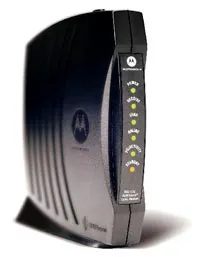
Cable modems are still the standard workhorse for getting high-speed Internet connections directly from your cable provider’s coax infrastructure. Just connect and you are online. Everything is simple until rush hour.
This reduces performance. Significantly.
Why? Because cable internet is a shared medium. Unlike fiber, which typically provides dedicated bandwidth to each home, neighborhood’s data is relayed through a single node. If everyone upstairs and downstairs is streaming 4K video or downloading game updates at 7:00 PM, that node will be clogged. The modem works hard, but the pipe is too narrow for the traffic load.
You may notice buffering during primetime. Or the initial download time is slower. This is not a device malfunction. This is a physics of the cable network.
Comparison of cable modems and competitors
If you’re considering cable modem options, you’re probably comparing it to DSL or fiber. This is how the equipment works in real use.
- DSL : Uses a telephone line. It works almost everywhere, but it’s slow. It is also affected by distance attenuation. The further you are from the central office, the weaker the signal.
- Fiber optics : Light pulses pass through the glass. It offers symmetrical speeds (uploads and downloads are equal) and doesn’t suffer from congestion issues like cable. Although this is the gold standard, it is not available in all regions.
- Cable : Delivers high download speeds but uploads are usually slower. Although the shared bandwidth model is widely available and affordable, it has its Achilles heel.
“I wish I had cable internet, but I don’t. If a neighbor logs in, the speed may be slower than what you paid for.”
Choose the right hardware
Not all cable modems are created equal. If you have a high-speed connection (like 300 Mbps or higher), an older DOCSIS 3.0 modem can become a bottleneck for your connection. You need a DOCSIS 3.1 compatible modem to handle modern loads and accommodate future ISP speed increases.
Check the list approved by the service provider before purchasing. Some ISPs limit the models they support, even if modems are technically possible. Incompatible hardware can cause compatibility issues instead of improving speed.
Who wins in the jam?
If your community is overloaded:
1. Fiber Users generally remain stable.
2. DSL users are stable but slow.
3. Cable User performance varies.
If you work from home or game competitively, this difference can be frustrating. You need predictable latency. Cable can deliver that during off-hours. During peak times, it’s a gamble.
Cable Modem The choice of hardware is less important than the underlying network type. If your ISP offers more bandwidth, upgrading to a faster modem may help, but it won’t solve the shared node congestion problem. To ensure true reliability, check what’s available in your zip code. The initial cost of fiber optics may be higher, but the consistency is usually worth it.
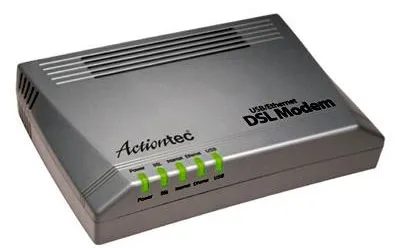
DSL: Legacy Backbone still in use
Digital subscriber line technology is still central to millions of homes. Send data to your home using your existing copper phone line. What’s the trick? Separate Internet traffic from voice calls. Call and watch Netflix from your landline without service interruptions.
However, there are physical limitations. As the distance increases, the signal weakens. Speeds vary greatly depending on how close you are to your provider’s central office. The closer it is, the faster it is. Farther means slower. If you live outside the direct service area, DSL may be the only option. It is not fast by modern fiber standards. Reliable. Usually cheaper.
This technology has been in use for decades. No new infrastructure is needed. The service provider simply activates already existing lines. In rural areas or in older apartments, DSL is still a viable option. It’s not going away anytime soon.
Check local availability. Whether it is worth registering depends on whether you are close to the central office.
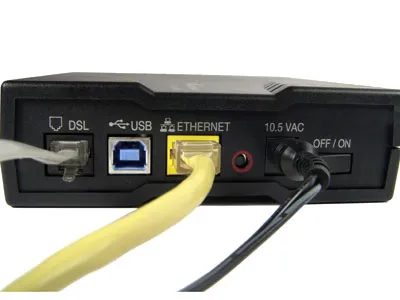
Connect via DSL or cable
Broadband modems are your bridge to the Internet. Whether you use DSL infrastructure or cable infrastructure, it handles the signal.
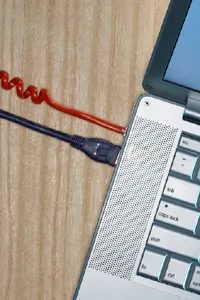
With a DSL connection, the line is connected directly to a telephone socket. Connecting to your device is easy. You can connect the modem to the computer with a USB or Ethernet cable.
This is a simple physical setup. However, the type of cable you choose is important. For many tasks, Ethernet offers better stability than USB.
Connect the DSL cable to the telephone socket and the USB cable or Ethernet to your computer.
If you want to know how to optimize this setting, start with cable selection. For consistent speeds, Ethernet is usually a better choice. USB works, but performance may be limited depending on the version of the port.
This hardware choice determines your base speed. The modem itself does not create the Internet. It just converts the signal from the wall.
Why Ethernet is still dominates
You may be wondering why Ethernet is preferred over USB.
It’s all about latency and reliability. Wired connection reduces interference. It keeps the ping low. In gaming and video calls, the difference is very noticeable.
USB ports can be tricky. Share bandwidth with other devices. Ethernet occupies one channel. It’s cleaner.
Does your computer have an Ethernet port? This is true for most desktop computers. Laptops usually require an adapter. This adds an extra point of failure.
Think about where you will place your gear. The modem must be near a wall outlet. The computer must be within reach of the cable. This limits mobility.
But mobility is not always the goal. Stability is.
What happens next?
You’ve got the modem plugged in. The indicator light is flashing. you are online
But how do you get that signal to your home network? This will be the next puzzle.
In the next step, we will look at the Ethernet connection. It’s not just about plugging in. It’s about understanding the infrastructure.
The cables you use today will determine your experience tomorrow. Choose wisely.
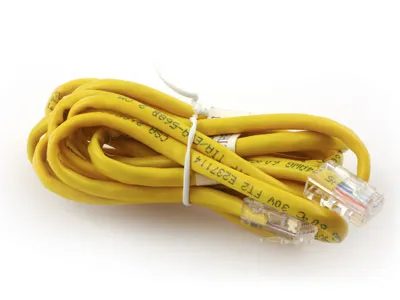
Forget about 5G and the hype about fiber to the home for a moment. We start with the mainstay of local networks: Ethernet. Although this is not new, it is increasingly becoming the preferred method of connecting to the Internet.
Ethernet cables connect nearby devices (desktops, consoles, smart TVs) to your local network and the wider Internet. We often think of these as background infrastructure. We should stop. Your next Internet connection relies on these physical ports and is a newer, more reliable way to bring high-speed connectivity to your home.
Why physical ports still rule
You might think that wired connections are a holdover from the dial-up era. They aren’t. The convenience of Wi-Fi connectivity is critical for mobile phones and tablets, but they also face challenges such as interference, loss of range and congestion of shared bandwidth.
Ethernet bypasses this. It offers:
– Less lag in gaming and real-time communication.
– High stability, no signal loss.
– Predictable speeds tailored to your ISP, unlike wireless throttles.
A new wave of wired connections
This isn’t just a matter of connecting to a router in 2015. Ethernet-centric setups are making a comeback. Service providers are increasingly promoting fiber to the home (FTTH), which usually terminates at an ONT (optical network terminal) and connects to the home network via Ethernet.
The “new” aspect here is how these connections work. The physical medium is typically fiber optic or high-quality copper wire that runs directly through the wall, rather than coaxial cable or DSL. Interface – 1 Ethernet port.
Use for everyday users
You don’t need to be an IT expert to use this feature. All you need is:
1. Ethernet cable (Cat5e, Cat6 or higher).
2. A Device (laptop, desktop, console) with an Ethernet port.
3. Network source (router, modem or wall plug).
Connect the other end to the device. Connect the other end to a power source. graduation. The connection is active. There is no password. There is no pairing delay. There is no connect to network spinner.
Which devices benefit the most?
Not all devices require wires. Your phone works fine on Wi-Fi. However, Ethernet is better for demanding fixed devices.
| Device Type | Wired Benefits |
|---|---|
| Game Console | Consistent ping time. No lag spikes during downloads. |
| Home Server | Reliable data transfer speeds for backup and media streaming. |
| Desktop | Maximize performance for large file transfers and competitive gaming. |
| Smart TV | Smoother 4K/8K streaming without buffering. |
Ethernet port location
Look behind the router or modem. Look at the back of your desktop computer. Look at the side of your TV. If you see a square port with eight small pins, that’s an Ethernet jack.
If you are setting up a new Internet connection, ask your service provider if they offer fiber optic cable or high-speed cable with an Ethernet jack. Many do. Some offer routers with multiple Gigabit Ethernet ports.
Why you should care now
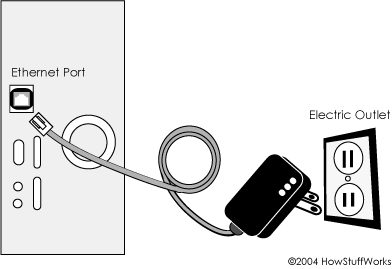
Powerline broadband dead end
Remember the promise of Broadband over Power Lines (BPL)? This idea is attractive in its simplicity. It uses the existing copper veins of the electrical grid for fast data transfer. Plug the router into a standard outlet. No coaxial cable. There are no phone lines. Power and data only run on the same wire.
It never happened.
Not on any meaningful scale.
BPL faces a wall of technical and regulatory noise. Power lines are not designed for high-frequency data transmission. It’s a noisy environment. Interference with radio broadcasts is rampant. US and European regulators reacted strongly. The cost of filtering and protection. At the same time, fiber optic and cable DOCSIS are faster and cheaper.
BPL is still a niche experiment. A ghost of what might have been.
If you’re looking for a technology that truly delivers on the promise of the “last mile,” consider Fiber to the Home (FTTH). A logical successor. But before we dive into fiber optic cables, let’s understand why BPL failed. It’s about finding solutions to problems that don’t exist.
Why fiber wins
FTTH is more than just an upgrade. It’s a completely different physics.
BPL tries to take advantage of dirty and noisy infrastructure, while optical fiber uses light. Glass strands. Lasers. Compared to copper cables, the bandwidth possibilities are almost unlimited. Lower latency. As the distance increases, the signal degrades.
Key differences between BPL and FTTH:
– Interference: BPL is affected by EMI (electromagnetic interference). Fiber is immune.
– Speed: BPL strives to maintain a consistent speed. FTTH offers symmetrical gigabit speeds.
– Scalability: Copper cable upgrades are expensive. Fiber upgrades usually mean upgrading endpoints, not circuits.
BPL is a dead end. Fiber optics is an open road.
How optical fiber works
FTTH connects fiber optic cables directly to your residence. Don’t just go to the basement of the building. Not just to the neighborhood cabinet. To your home.
Inside, a ONT (optical network terminal) converts the optical signal to an Ethernet or Wi-Fi network. This differs from FTTC (Fiber to the Curb) or FTTN (Fiber to the Node) where the copper cable still handles the last leg. The copper part is the bottleneck. FTTH removes that.
The hardware is simple. Network architecture is complex.
PON (Passive Optical Network) is the leading standard. The splitter is used to distribute one fiber strand to several homes. The splitter does not require electricity. This reduces maintenance costs and points of failure.
Why is it important to you?
You get what you pay for. But with fiber, “pay for” part is more consistent.
- Transmission speed: Most cable providers limit the transmission speed to 50 Mbps. Fiber optics offer symmetrical speeds. 1 Gbps up. 1 Gbps down. This is important for video calling, cloud backup and streaming.
- Stability: No copper corrosion due to weather. Similarly, shared bandwidth does not cause congestion.
- Future-Proof: Glass can transmit more information. Usually the limiting factor is the router, not the wire.
BPL is a distraction.
Why FTTH is the gold standard for home internet
Fiber to the home is more than just a fancy acronym. This is the physical reality where the light passes through a bundle of glass to reach the outlet in the wall. Unlike copper wire, which is sensitive to distance and interference, fiber optic cables transmit digital signals in the form of light pulses. This makes data transfer very efficient.
Telephone service is available. video streaming. Large file transfer. All along the same line.
Efficiency is not just speed. It’s a reliability issue. Copper deteriorates. Fiber optics doesn’t care if it rains or someone chews through a line nearby. The signal remains intact.
“Fiber optic systems can transfer digital information such as phone calls, video and data very efficiently.”
This is not a theoretical matter. This happens when you plug your router into the wall that supports fiber connectivity. Latency is reduced. The jitter disappears. Video calls are not pixelated.
However, fiber optics is not the only option. Mobile broadband coverage expands, giving you flexibility in places where cable can’t reach.

How mobile broadband actually works
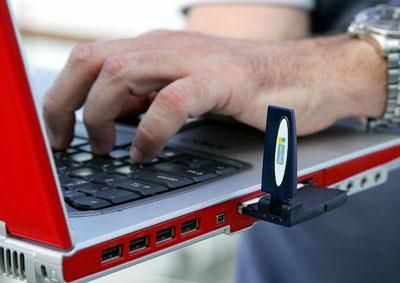
Forget those clunky routers from the early 2000s. Modern mobile broadband has been stripped down to its bare essentials. Connect the small wireless card to the laptop. That’s it. The card captures the mobile signal and converts it into a data stream. You’re online.
Consider T-Mobile’s approach as an example. Their hardware is unobtrusive. But it works because it takes advantage of existing cellular networks. It did not create a new signal. It uses the infrastructure built for voice calls. This shift is important. This means you are not tied to an outlet. The Internet is with you.
Most services do not require complex configuration. You don’t need to set up a gateway or run Ethernet cables throughout your apartment. The complexity is hidden inside the cards. The user experience is still simple. Connect. Browse. disconnect.
Why this change changes everything
The real value is not in the technology itself. It’s in the availability. Before wireless cards, the Internet was a place. specific location. Now, it’s a state of being.
This portability solves the unique problems of travelers and remote workers. You can also work in a cafe. Or a train. Or a park. Barriers to entry are low. If your phone has data, your laptop may be able to join the party through this card.
Consider your hardware. It’s small. light. It fits in your pocket. This physical reduction is equated with software simplification. No drivers to wrestle with. There is no need to remember IP addresses. Just plug it in and you’re good to go.
Pitfalls: Signal dependencies
This is not magic. This is physics. The quality of your connection depends entirely on the strength of your phone’s signal. There is a dead zone. Connections are often lost in the basement. drop packets on high-speed trains.
That’s why it’s important to understand the operator’s service area map. The most powerful cards are useless in areas with zero signal reception. You need to know where your service provider has installed cell towers. This is true not only in cities but also on roads between cities.
“The card is just a translator. The network does the heavy lifting.”
What happens next?
The hardware will get smaller. The speeds will get faster. However, the basic principles are the same. A small device. A cellular signal. Instant access.
If you want to know more about how it works, the next section explains how these cards handle packets. It’s not as attractive as the end result. But this is where the real magic happens.
Connect with a wireless card
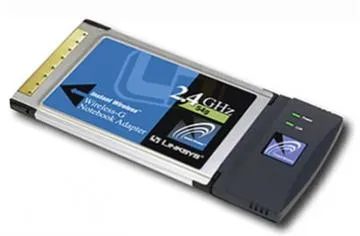
A Wi-Fi card is the hardware that connects your device to the local network. If you have a wireless transmitter or adapter nearby, these cards allow you to establish a network connection without connection cables. You can also use it at home. Can be used in public hotspots.
Many modern laptops have these cards built right into the motherboard. These are not necessarily external add-ons. Before you worry about buying hardware, check the specifications of your device. However, if you need to check signal aspects, this is an important factor for a stable connection.
Routers: Gateway to the Wireless Age
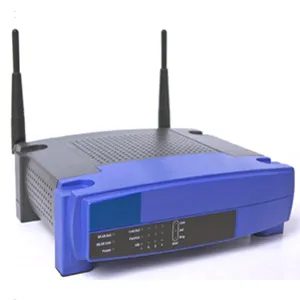
If you want to use WiFi at home, you need a router.
A device that transmits signals. You can detect it with a wireless sensor or laptop WiFi card. Then you can connect. Then you are online. Simple.
Some of these signals are huge right now. We’re talking about a wider coverage than most people expect. But before we talk about giant towers and mesh systems taking over your living room, let’s go over the basics.
A router is more than just a box with flashing lights. It’s your home internet traffic cop. Without it, your broadband connection is stuck in one place. The router receives the wired signal and transmits it as radio waves. Any device within range can pick up these waves.
This is not a new technology. However, things are changing. Early routers were big. They covered one room. When you enter the kitchen, the connection is lost. Today’s models? They’re smarter. They handle more equipment. They break through walls.
However, the basic functions remain unchanged. send a signal. Allow connection. Internet access is provided.
When setting up your network, start with your router. It’s the foundation. Everything else is built on top of it.
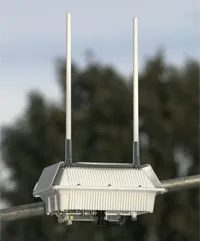
Think municipal WiFi is just free internet on the street corner? Things are more complicated than that. The vision is attractive. Cheap or free connections to the entire city. Routers are installed on existing infrastructure, such as light poles. However, the implementation was chaotic.
The hardware is usually standardized. You can see that the same mesh nodes are repeated in different cities. The goal is comprehensive coverage. Fills the gap in private ISP services. Reaches areas where broadband is unprofitable.
How municipal WiFi networks really work
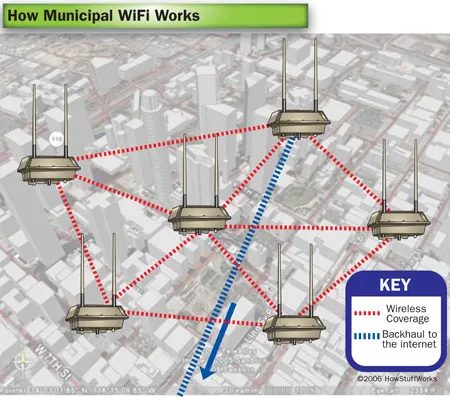
Most setups are based on a mesh network topology. Nodes communicate with each other. Transfer the data to the central gateway. This eliminates the need to install miles of fiber to each pole, allowing for larger coverage areas.
But there’s a problem. Performance varies widely. Congestion is common. Too many users on a node slows everything down. It’s not like a separate home broadband connection.
Why local government projects struggle
Funding is the first hurdle. Cities do not have endless budgets. Maintenance costs are increasing. Hardware failure. You need to update your software. Who pays for this?
Next is the regulatory environment. The FCC has placed a roadblock. spectrum licensing and liability regulations slow down many projects. Some cities left. Others tried to get around these restrictions.
The Trade-offs of Public Access
Yes, access is provided. But can it be trusted? For a quick check? Perhaps. For streaming? Usually not.
Privacy is another matter. Who monitors the traffic? Is it anonymous? It has faced backlash in some cities over surveillance concerns. the perception sticks even if the data is deleted.
Yet there is still demand. The digital divide is real. Students from underserved areas need help with homework. Job seekers must submit an application. Municipal WiFi can fill this gap. If it works.
Which Cities Tried It?
Portland, Oregon and Philadelphia, Pennsylvania. Montgomery, Alabama Each has its own unique twist. Everyone faces unique challenges. Some scaled back. Some are completely closed. Those that persist often work with private ISPs. The load is shared. Share the risk.
lesson? Infrastructure alone is not enough. We need a sustainable model. Clear governance. Realistic expectations. Otherwise, this is just an abandoned technology project.
A look into the future
The conversation is not over yet. It has evolved. Cities are looking for alternative models. Public-private partnership. Smaller pilot zones. Better pricing structure.
The goal is still access. But the path is not so straight. Not very idealistic. More practical.
Does it matter? This may not be the case when people are online. However, the technology environment is changing rapidly. What worked in 2010 doesn’t work now. It’s not just a question of whether it can be done. Should we do that? And how?
The answer is not known. They are messy. As with most urban projects.
How wireless mesh networks really work
Forget about one router down the hall. Wireless mesh networks change that by splitting the signal. Instead of installing a hub that spreads Wi-Fi to every corner of your home or office, you can work together with tens or even hundreds of smaller network nodes.
These nodes do not repeat signals blindly. They talk to each other. Constantly. They share the load and connectivity widely, creating a single unified network layer. If one node fails or experiences congestion, the other nodes adapt. They reroute data through neighboring nodes to keep things moving. This is a self-healing network.
Think of it as a relay race where the baton is an internet connection and each runner is also a navigator. The result is a wider and stronger Wi-Fi coverage than in a separate base station.
Why this matters for coverage
Traditional routers suffer from distances and physical obstacles. Walls. Floors. Metal pipes. Mesh systems avoid many of these problems by hopping from one node to another. Each node can extend its range without the noticeable slowdown seen with older range extenders.
This method is ideal for large residential buildings or multi-storey commercial premises. You stop seeing dead zones. Never again will you face the dreaded “Connected, No Internet” status. Networks adapt to their environment.
See a bigger WiFi network on the next page.
The reality of satellite connections
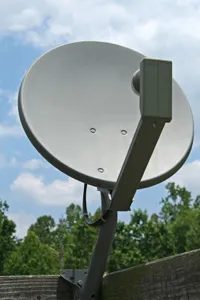
Satellite internet works by transmitting data to a satellite dish installed in your location. Process shipments and loadings through a single point of contact with the forklift.
This is not the fastest option. Latency can be an issue. Speeds are typically slower than fiber optic or cable. But for many, it’s the only option.
Where It Fits
This type of connection is useful in rural areas. Consider areas with no other connection options. Infrastructure doesn’t reach there. Cables cannot be pulled efficiently.
If you’re off the grid, satellites can be your backbone. It’s not about speed. It’s about access.
Consider trade-offs
You get coverage where others don’t. However, you pay the price in delay and costs. Data restrictions may apply. Weather can be a factor. Signal loss during storms is real.
Still, it’s beats dial-up or nothing. This is a lifeline for remote workers, hunters or residents of large rural areas.
The big picture
Next, let’s look at an easier Internet connection. Something that works by plugging it into the wall. No dishes. No alignment. It’s simple.
Hardware behind the hotspot
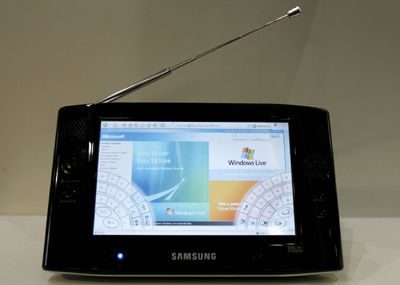
We tend to think of connectivity as magic, when really it’s just physics and radio waves. Portable Internet Devices are the physical manifestation of this convenience. They don’t sit still. They travel with you and connect to global networks via WiFi and WiMAX protocols.
You probably already own the most common example.
A smartphone.
Especially the iPhone.
These gadgets rely on WiFi for local area networking. They go through walls and find open signals in coffee shops, airports and homes. But they also look outward. They scan a wider range of mobile data networks. In the early days of mobile broadband, WiMAX was 4G LTE’s main competitor. It promises faster speeds even over long distances. Takeoff failed. The market chose LTE. But the tradition of trying to move high-speed data into pocket-sized boxes remains.
Why is this important?
Because your phone isn’t just a phone anymore. It’s a router. It’s a computer. It’s a portal.
Enabling the Personal Hotspot feature shares your mobile connection with your laptop. Creating a local WiFi network. This will change the way we work. You can sit on a park bench and join a Zoom meeting. Upload photos of your hiking trails without waiting for a Wi-Fi connection.
The technology is simple.
The device connects to the Internet source.
It broadcasts that connection.
Other devices join.
But the experience is complicated. This will drain the battery life faster. My data plan has been used up. Security is an issue if you leave the hotspot open.
We take it for granted until the signal drops.
Remember, behind every smooth video call or instant message is a device that’s charged, connected, and in range.
The iPhone didn’t invent mobile internet. It complements the user experience in all respects. Understand the “always on” lifestyle.
But the players are much more. You can do the same with your Android smartphone. Tablets work the same way. There are Mi-Fi devices.
The core truth remains.
Portability requires power.
The power source must be charged.
Connections require infrastructure.
We are moving towards a world where offline is the exception rather than the rule. And that is both liberating and exhausting.
You are always available.
The signal is always there.
But can you turn it off?
That is the real question.

Beyond free access: how city WiFi is actually used
When most people think of public wireless networks, they think of free or low-cost Internet. This is a great hook. How to check your email while drinking coffee without using up your data plan. However, this is only a superficial view. Their usefulness becomes even deeper when you look under the hood into how these systems are actually deployed.
The WiFi camera is one of the biggest advantages here. You know the type. These aren’t just security devices you can buy at a big box store. We are talking about infrastructure-grade cameras that upload images automatically. Send data directly to your computer or the cloud from any location on the network.
This feature works as long as you have an active Internet connection. In a city-wide municipal network, this is usually a matter of course.
The transition from passive contact points to active data collection changes everything. It’s not just about browsing speed. It’s about connectivity that enables automation. You don’t need to store gigabytes of footage locally if your camera can stream directly to the server the moment it’s captured.
Consider the logistics. When you manage properties across city or state lines, distance is not an issue. The municipal network fill this gap. You get the picture. This system handles the heavy lifting of the transmission.
This is where the term “smart city” ceases to be a marketing term and becomes a practical term. It’s not just about letting tourists to tweet from a park bench. It is designed to ensure that devices that rely on a continuous and reliable uplink connection can function properly.
The implication is straightforward, but often forgotten. When cities invest in wireless infrastructure, they are building a nervous system. Like the rest of the nervous system, it is designed to transmit information quickly.
So while the promise of free Wi-Fi gets the headlines, the real value is lies in the background. It’s in the automated uploads. Seamless data transfer. The ability to easily track and manage assets remotely.
It’s less about access and more about capability.
“With a WiFi camera, you can automatically upload pictures to your computer or Web space from anywhere.”
This sentence sounds easy. However, try doing it over a dead zone cellular connection. Now try doing it to use it without buffering. The municipal network remove this friction.
This changes the way we think about public infrastructure. It’s not just water and electricity anymore. This is the platform. Systems that support devices, cameras and sensors that need talk back with headquarters.
The cost savings are real. You don’t need to pay for a separate data package for each device. You don’t have to pay expensive mobile data roaming charges. The city will supply the pipe. The device delivers the information.
This is the transition from consumption to creation. And distribution.
Of course, not all cities have cracked the code. Some people are still struggling with coverage. Some companies have faced privacy issues that have slowed their adoption. But the technology itself is proven. The hardware exists. The bandwidth is there.
What is often missing is vision. look past the free coffee shop internet the Internet and reach out more widely.
Imagine traffic cameras streaming directly to a central analysis center. No delays. There are no local storage restrictions. Just a continuous feed. Or environmental sensors that report air quality in real time and transmit the data to public dashboards.
municipal wireless can do that. That’s not all


Why commuters exchange commuting time for connections
The definition of an productive commute has changed. In San Francisco, the MUNI system quietly proves that public transportation doesn’t have to mean disconnecting. Their connected buses now have a Wi-Fi connection. It is no longer a luxury accessory. This is infrastructure.
Consider the typical business traveler. They used to treat the ride as downtime. Now they are accessing to sales reports. Prepaid Internet service is a bridge between the street and the office.
“Efficient traffic is not about speed, but about transportation.”
This is more than just catching up on Slack. It changes the way urban spaces work. When you can riding across town to download client files, the office follows you. The line between “home” and “work” is blurring.
Which network do you trust with your sensitive files? Municipal Wi-Fi or your own hotspot? The answer changes how you pack for the day.
The technical side is simple. The router is mounted on the ceiling. The signal is bounces off windows. You connect. You work. But the implication is huge. Cities are becoming distributed offices.
San Francisco is leading the way in this specific charge. Other systems are watching. If MUNI can keep the buses moving and connected at the same time, it will set the standard.
Do you take your laptop on the bus now or wait until you get to your desk? A habit is forming. The equipment is there. All that’s left is bandwidth.

The dream of a unified open network is beginning to crumble. It does not happen as a result of a sudden collapse, but a slow and deliberate collapse. We see proprietary platforms and specialized hardware fragmenting the digital landscape into walled gardens.
“The Internet as a public square is being replaced by private clubs, each with its own rules, entry fees and design philosophies.”
Rise of the walled garden
It starts with the app. Then there are super apps. Now, it’s hardware.
Apple tightly controls the iOS ecosystem. Android manufacturers operate in their own silos, but Google still controls the reins through its services. And then there’s China’s WeChat, which handles everything from messaging to banking. These are more than just platforms. And they’re closing their doors.
The result? iPhone users have a different Internet experience than Windows PC users. Korean gamers see a different digital reality than freelancers in Berlin. The underlying protocol, TCP/IP, remains unchanged. But what about the experience? It’s diverging.
Hardware as a new firewall
It’s not just software anymore. It’s silicon.
Let’s take the Apple Vision Pro as an example. It is not a browser window that can be resized or leave. This is a spatial computing environment. Apple decides what you see. Meta’s Quest headsets do the same. Even smart TVs that once opened a window to the Internet now have their own app stores and streaming services to lock you in.
Device manufacturers understand that the real value is not in the device. It’s in the ecosystem. Ecosystems thrive on exclusivity.
Why this matters to you
You might think you’re just choosing between brands. But you’re actually choosing between realities.
- Search results vary depending on the platform. Google prioritizes web links. Apple’s Siri prioritizes apps. Amazon’s Alexa prioritizes Amazon products.
- Social interaction isolates. What you share on Facebook may not appear on Instagram. Everything you post on Twitter (X) may never see the light of day on Threads.
- Data ownership has weakened. The activity on proprietary platforms is mined, sold and used to improve algorithms that keep you engaged. You do not own that data. The platform does.
The Fragmentation of Access
This splintering is not just for convenience. It’s about access.
They control the gates platforms become walled gardens. They decide who gets in and what you see. In some areas this means censorship. In others, it means price discrimination. Internet speeds may also be slower for those who do not pay for additional “premium” access.
The open web are becoming a luxury. Places to visit. Not where you live.
Can It Be Reversed?
It’s not easy. For companies, these incentives are too strong and for companies to open their doors. Profit margins are tied to exclusivity. Data is the new oil. once you’ve drilled it, you don’t give it back.
But users are resisting. Privacy advocates. Open-source developers. Even EU and US regulators are trying to force interoperability. The European Digital Markets Act is a start. This requires large platforms to allow users to move their data and connect with competitors.
Will it work? Maybe. But it’s an uphill battle