You press the power button. The fans spin. The lights blink. But before you see a logo or a desktop, something ancient is doing the heavy lifting.
It’s not magic. It’s the BIOS.
Most people think of their operating system as the brain of the computer. They’re wrong. The brain doesn’t even exist yet at startup. The BIOS does. Its primary job is to load the operating system. Without it, your hard drive is just a silent box of magnetic platters or flash chips. The microprocessor has no idea how to read them. It needs instructions. The BIOS provides them.
But it does more than just point to the boot sector.
When you turn on your PC, the BIOS runs a specific sequence. It’s a checklist that keeps your hardware from falling apart before you’ve even opened a browser tab.
The Boot Sequence Explained
The process starts with the CMOS Setup.
This is a tiny 64-byte section of RAM on your motherboard. It stores custom settings. Your system time. Your boot order. Hardware quirks. The BIOS reads this data first to adjust its default programming. If you changed the boot priority to start from a USB drive instead of your SSD, this is where that decision lives.
Once it checks the CMOS, the BIOS begins to initialize the hardware.
It loads interrupt handlers. These are small pieces of software. They act as translators. When you press a key, the signal doesn’t go straight to Windows or Linux. It goes to the keyboard interrupt handler. The handler tells the CPU what just happened and passes it along. Without these handlers, your computer would be blind and deaf.
Then it loads device drivers. These identify basic hardware. The keyboard. The mouse. The hard drive. The floppy drive (yes, even if you don’t have one anymore, the code is still there).
The BIOS also checks for other BIOS chips. If you have a graphics card or a SCSI controller with their own firmware, the main BIOS activates them. This ensures every piece of hardware can talk to the rest of the system.
Why BIOS Exists
The name itself gives it away. Basic Input/Output System.
It provides low-level routines. These are the instructions the operating system uses to interface with hardware. Specifically during boot. It manages the keyboard. The screen. The serial and parallel ports.
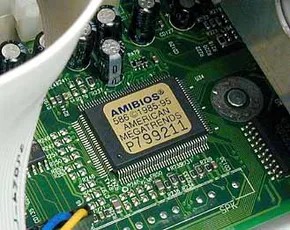
It’s special software. Usually, it’s stored on a Flash memory chip on the motherboard. Sometimes it’s ROM. This location is critical because it’s the first thing the CPU can access. It’s independent of the main storage.
Shadowing and Speed
There’s a catch with BIOS code. It lives on slow memory chips.
But the CPU wants speed.
So the BIOS copies itself into RAM. This process is called shadowing. By running from RAM instead of the slow EEPROM or Flash chip, the BIOS routines execute much faster. The CPU can intercept signals to and from hardware without waiting for the motherboard chip to catch up.
The Power-On Self-Test
Before any of this happens, there’s the POST.
Power-On Self-Test.
The BIOS checks every major component. Memory. CPU. Keyboard. Mouse. It’s making sure nothing is broken. If a fan isn’t spinning or a memory stick is loose, the BIOS will beep or show an error code. It’s the gatekeeper.
If the POST passes, the BIOS determines which devices are bootable. It looks for a boot sector. Then it initiates the bootstrap sequence.
This hands control over to the operating system.
Why You Should Care
You might not think about BIOS often. You don’t have to. But it’s the bridge.
It connects your physical hardware to the software you use every day. When you install a new GPU, the BIOS on that card has to play nice with the motherboard BIOS. When you update your drivers, you’re essentially replacing the software that was once handled by the BIOS.
The CMOS settings can change how your computer behaves. Overclocking? That happens in the BIOS. Secure boot? That’s a BIOS feature.
It’s old technology. But it’s still the foundation.
Without the BIOS, there is no computer. Just a collection of expensive parts waiting for instructions that will never come.
So next time you hear that beep, listen. It’s not an error. It’s just the system waking up. Ready to load the OS. Ready to work.
Or not. If the POST fails, you’re on your own. The screen stays black. The fans spin. And you have to figure out what broke.