Most people ignore updates until something breaks. Or worse, they ignore them entirely. That is a bad idea.
Cybercriminals love outdated software. They hunt for known holes in old versions of common programs. Fixing those holes is not optional. It is basic hygiene.
IObit Software Updater exists to handle this chore for you. It is a utility for Windows. It finds your apps. It downloads the fixes. It installs them. You do not need to be a techie to use it.
“The main goal of IObit Software Updater is to centralize the search, download, and installation process for the latest versions of installed programs on Windows.”
This approach keeps your system stable. It closes security gaps. It removes the friction from staying current.
Why Regular Updates Matter
Security is the primary driver here. Many exploits target old versions of browsers, players, and tools. If you are running legacy code, you are vulnerable.
Manual checking is tedious. You have to open each app. Check the “About” menu. Visit a website. Download a file. Install it. Repeat.
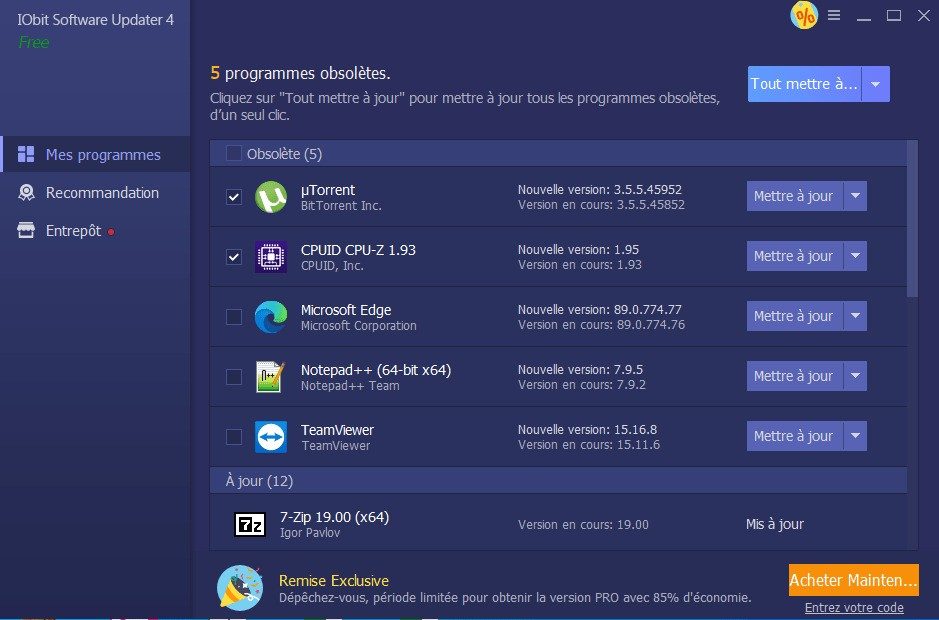
IObit Software Updater centralizes this. It scans your machine. It builds a list of what needs updating. Then it offers a one-click solution.
This matters for professionals too. Schools and offices have dozens of machines. Manual updates are unrealistic at scale. A dedicated tool saves time and reduces risk across the board.
How to Install and Use It
Getting the software is straightforward. Go to the official site. Or use trusted tech portals like Futura. These sources provide clean, reliable versions.
The basic version is free. It covers the core features. You get enough to stay safe and updated.
Installation is quick. Run the file. Follow the prompts. The assistant guides you step-by-step. No complex settings to navigate.
It works on Windows XP through Windows 11. This wide compatibility helps businesses with mixed fleets. It also helps individuals with older PCs.
Note that it does not support macOS, Linux, Android, or iOS. It is strictly for the Windows ecosystem.
During setup, you can choose the install folder. You can create a desktop shortcut. Once installed, it runs its first scan immediately.
You can plan updates. Set reminders. Install multiple apps at once. The interface is clean. It guides you through every step.
Beyond Just Updates
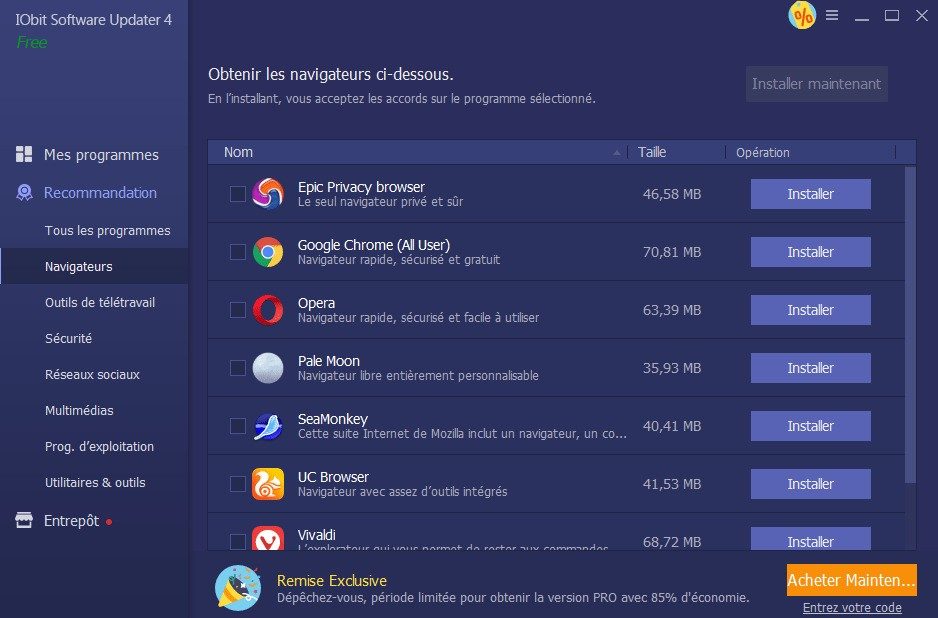
The tool does more than just patch existing apps. It also recommends new software.
It suggests popular and secure programs. This helps you discover tools you might need. It simplifies finding safe replacements for discontinued apps.
Some users might want an older version. You can find archives online. But be careful. Old versions lack new protections. Stick to the current release unless you have a specific compatibility constraint.
The design is intuitive. Students can use it. Professionals can rely on it. IT managers can deploy it.
Everyone gets an updated, secure environment without the headache.
The Bottom Line
Keeping software current is non-negotiable. Ignoring it is a gamble you shouldn’t take.
IObit Software Updater removes the guesswork. It handles the scanning. It manages the downloads. It simplifies the installation.
For Windows users, it is a practical shield. It keeps your digital life running smoothly. And securely.
What will you do when the next major vulnerability is announced? Will you check each app manually? Or will you have the tool already in place?

The market for keeping your apps current is crowded. You have Patch My PC. Glarysoft Software Update. SUMo. Each claims to solve the same headache: your software is outdated, and security holes are forming.
IObit Software Updater doesn’t try to be the most complex tool in the shed. It wins on simplicity. It pulls updates from controlled, official sources. That matters. You aren’t guessing if a driver is safe. You are downloading from a verified track.
Other managers force you to click through every single step. Manual checks. Manual approvals. IObit automates the heavy lifting. It filters for certified programs to cut out the noise. Less clicking. Faster results.
Is the Pro version worth the cost?
Price often decides the winner. The free version of IObit Software Updater handles the basics well. It detects updates automatically. It installs them in groups. For a casual user, that is usually enough.
But the Pro tier changes the game. It unlocks real-time automatic updates. Downloads speed up. Ads disappear. Support becomes priority.
Pricing shifts based on license length and how many machines you cover. There are discounts for students and professionals. The official site lists the latest rates and active promotions.
Who needs Pro?
- Personal users with occasional needs: The free version likely suffices.
- Power users or small businesses: The Pro version offers time savings and stronger protection.
This split allows IObit to serve everyone from a single laptop owner to an IT department managing dozens of PCs. The model stays transparent. You pay for what you actually use.
Compatibility across Windows versions
Keeping apps updated is only half the battle. The OS has to support them. IObit Software Updater works across a wide range of Windows environments. We are talking Windows XP all the way to Windows 11.
That legacy support is not just for nostalgia. It allows for gradual transitions between OS generations. You avoid the sudden performance drops or software incompatibilities that plague abrupt upgrades. It is a buffer. A safety net.
You can trigger searches manually. Or schedule them. The built-in planner gives you control. If a critical vulnerability pops up, you can force an immediate scan. No waiting for the next scheduled window.
Support and user guidance
There is no official certification program here. No diplomas. But the documentation is detailed. It lives inside the interface and on the publisher’s website. It updates regularly.
For those who bought Pro, there is a direct line to technical support. Need help with a compatibility error? Stuck during installation? Curious about advanced features? The Pro support team steps in.
The goal is clear: centralize update management. Whether you are in a home office or a corporate network, the tool adapts. It reduces maintenance load. It keeps your software secure.
It works for individuals. It works for educators. It works for professionals. The choice comes down to how much time you want to save versus how much you are willing to spend. The infrastructure holds up. The rest is up to you.

Before you even think about clicking download, you need to know if this tool will actually run on your machine. It sounds basic. Most people skip this step. They just want the fix.
But if you are managing a fleet of machines or just paranoid about your legacy hardware, the specs matter. IObit Software Updater is designed to be lightweight. It isn’t trying to be a full operating system. It’s a utility. A sharp knife, not a chainsaw.
The developer is IObit. They make these things for a living. The software itself falls under the “Utilities” and “Security” categories. Specifically, it handles updates. That’s it. It finds them. It installs them. You don’t have to hunt through websites.
Windows Compatibility and Architecture
Here is where it gets interesting for IT managers. And regular users with old PCs.
The software supports Windows XP through Windows 11. That is a massive range. Most modern tools have dropped support for XP and Vista years ago. IObit still caters to them.
This isn’t just a gimmick. It means you can use this on a dusty office PC from 2008 or a brand new gaming rig.
It works in both 32-bit (x86) and 64-bit (x64) architectures. You don’t need separate installers. The executable detects what you have and adapts.
For those asking about which Windows version is best supported, the answer is all of them. But performance might vary. On older systems like XP, the scan will take longer. The database of updates is older. Modern Windows 10 and 11 machines will fly through the check.
Installation and Licensing Details
The file you download is a standard Windows executable (.exe).
It is signed digitally. This is important. A signed executable means you can verify its integrity. You know it hasn’t been tampered with between the developer’s server and your hard drive.
The license is Freeware. You can use it for free. It has limitations compared to the Pro version, but the core function—updating software—is there.
The Pro version adds automation. Scheduled updates. Batch installations. If you are an IT admin with fifty computers, you need Pro. If you are a user with one laptop, the free version is likely enough.
You need administrative rights on the machine.
Why? Because installing updates often requires writing to system folders or registry keys. The software won’t work if it doesn’t have permission to change things. If you are on a work computer, you might hit a wall here. Your IT department might block the installer.
Network and Disk Requirements
You need an internet connection.
This seems obvious. But some utilities can scan offline databases. This one does not. It connects to servers to check what versions you have against what is new.
Then it downloads the patches.
This requires bandwidth. Large updates for Adobe, Microsoft, or Chrome can be hundreds of megabytes.
Disk space is variable.
The installer itself is small. Maybe 10-20 MB. But the update files? They pile up. You need free space to download and extract them. If your C: drive is 90% full, the update will fail. IObit won’t magically create space. It just fails.
Security and Source Verification
Where you get the file matters.
The article mentions Futura as a trusted partner. This is key.
Third-party download sites are notorious for bundling malware. Or worse, they serve the wrong version. Or they inject adware into the installer.
Stick to the official IObit site or trusted partners. The executable is verified. The source is clean.
If you download from a shady mirror, you might get a trojan instead of an updater. Don’t risk it.
Key Features and Limitations
The core features are detection and group installation.
It scans your installed programs. It checks their versions. It flags the ones that are outdated.
You can then select all of them. Or just the critical ones. And install them in a batch.
This saves time. You don’t have to open Adobe