My 14-inch M2 MacBook Pro is a tank. I bought it in late 2020, treated it right, and it never blinked. Then I did the unforgivable thing. I spilled water. It started happening at a USB-C port, slowly corroding trust between us. Back it up. Genius Bar. Bye.
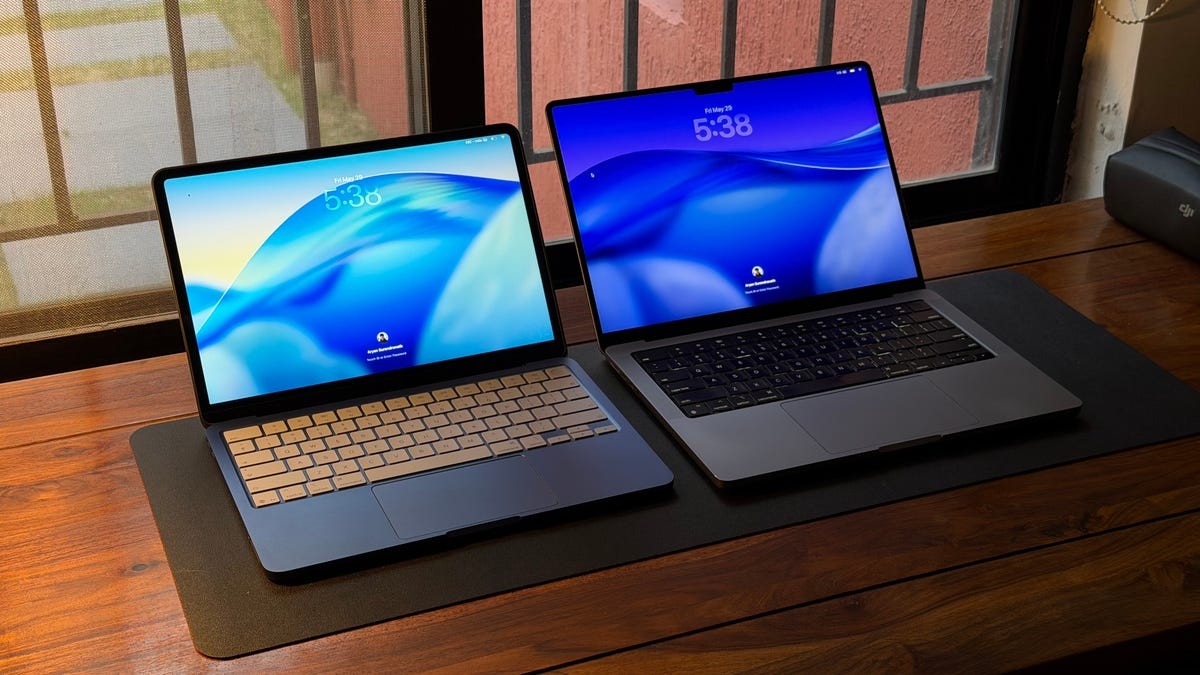
Timing was cruel. I had just picked up the MacBook Neo. So I sat there with the entry-level kid and my Pro in a box.
How Different? Night and Day.
Setup was a breeze. I used Time Machine. Same macOS. I felt right at home. Until I looked at the screen.
I went from 14.2 inches of Mini-LED brilliance to 13 inches of… LCD. It feels small. Brightness is lower. Contrast is duller. I dropped from 16GB to 8GB of RAM. No MagSafe. No SD card slot. No extra USB ports on the side.
But I had the 512GB model, so storage was fine. Touch ID was there (the 256GB model doesn’t even get the fingerprint scanner).
What I missed immediately? A backlight on the keys. It’s a flagship-grade keyboard that suddenly feels cheap when you edit videos at midnight in the dark.
Adjustments were necessary. Not for the software, but for my ego.
The Week Itself
I’m a creator. I cut vlogs in Premiere Pro. I research in Chrome. I write in Notion. I manage files in Finder. I use Google Workspace.
The Neo held up.
One beachball. That’s it.
It happened when I dragged 50 4K clips from an iPhone into Premiere, slapped filters on them, and had 25 tabs open. Don’t judge. I use tab groups for survival. On my Pro? Never a dropped frame. I have abused that machine for years. The Neo made me careful.
Exports were slower. But they finished. No crashes after that one scare. CNET’s Bridget Carey had similar thoughts. It’s competent. Boring, but competent.
The Grievances
- The Keys. I need backlights. Period. Apple knows how to do this. Fix it for the next version.
- The Screen Size. 13 inches feels tight when trimming seconds from a vlog. I squinted. I missed the real estate. The Neo supports one external display, which helps. But if I were designing a dream budget laptop? I’d make this bigger.
- The Charging Speed. This hurts. Battery life is decent—enough for a coffee shop sprint and a full edit. But plugging in takes forever. Even with a fast 45W charger, I sat tethered for an hour and a half just to wake up with power the next day. The included 20W adapter takes 2.5 hours for a full charge.
I worried about having only two USB-C ports. I was wrong.
One goes to my SSD for video footage. The other stays plugged into power. It works. It just requires discipline. If Apple moved a port to the left side on the next model? I’d sleep easier. Cables everywhere is no life.
Who Is This For?
$1,700 is what I paid for the Pro. For headroom. For speed. For “I will not need another computer for three years.”
The Neo is cheaper. It won’t last as long. It won’t render 8K video without huffing.
But for a beginner? For someone starting a YouTube channel from their bedroom? It’s enough.
I’m giving it to my partner. She’s moving from Windows. She needs Photoshop. She needs Illustrator. She tried it for a day. She liked it. Between her iPad and this laptop, the ecosystem locks tight. She’ll love it.
Me?
I’m going back to the Pro. The 16-inch screen. The backlight. The speed.
The Neo isn’t bad. It’s actually really good for what it is. I just have other demands. If I had a primary 16-inch beast at the desk? I might keep the Neo as a coffee shop travel machine.
But I don’t. So it goes to her. I stay in my box. The Pro waits.
It’s fine. It’s not perfect. It’s just enough for most people. That’s almost frightening these days.