We expected AI at WWDC.
Gods knows we did.
What we didn’t expect? A photo tool that actually made sense.
Not another “type a prompt and get a puppy in a spaceship.”
This was different.
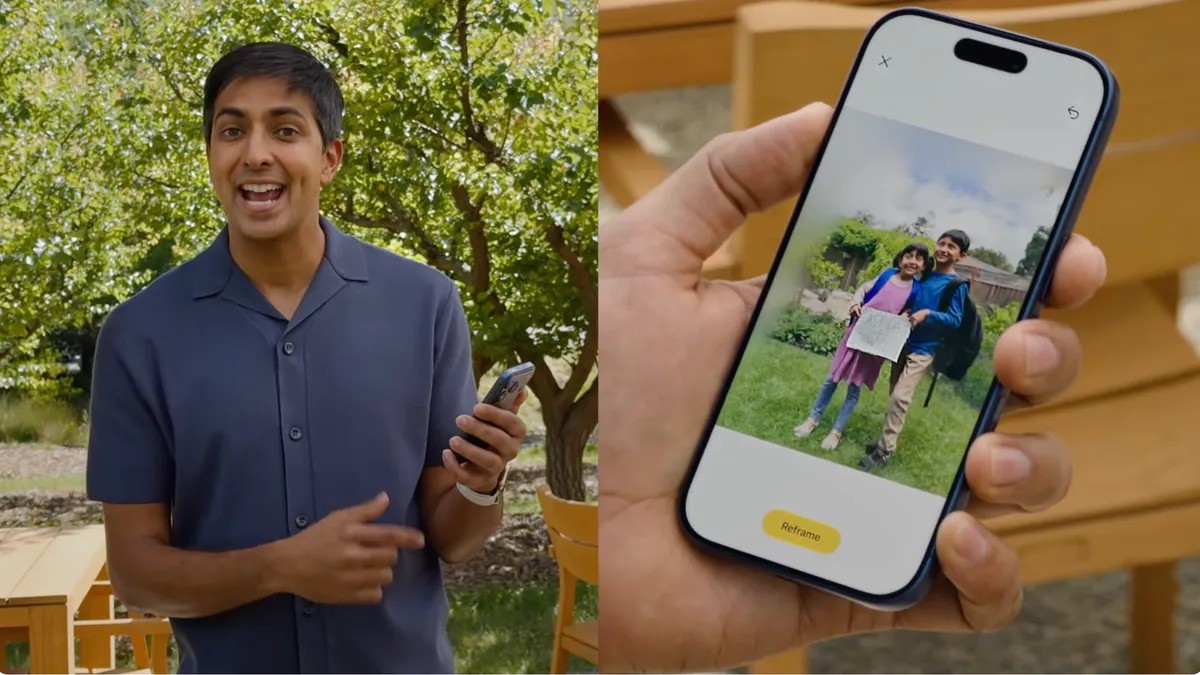
Spatial Reframing.
Apple dropped a new suite of editing tools during the Monday keynote. The usual suspect? A Clean Up function. Useful. But forgettable. Then came the ability to extend image edges. Also nice.
But Spatial Reframing stopped me in my tracks.
It lets you change where you stood when you took the shot.
All generative. All under a new “Tools” tab in the Photos app on iOS 26 (hey, it’s iOS 27 now, time moves fast). Developer beta is live if you want to mess with it.
Less slop. More soul.
Photographers hate AI right now.
Valid reason. The internet is drowning in generic, soulless, AI-generated trash. Apple’s own Image Playground app feeds that fire.
Yeah, even there.
But generation isn’t binary.
It doesn’t have to mean fabricating reality from thin air. Sometimes it means fixing the trash can next to your subject’s shoe. That’s manual labor saved. Google Pixels do it too with their Magic Eraser. It’s just efficient pixel replacement.
Spatial Reframing uses that same tech for a better goal: fixing bad composition.
You took the pic. You stood three inches to the left. It looks crowded. Now it’s not.
The parallax trick
Apple already does cool depth stuff with “Spatial Photos.” It guesses depth in a 2D image and creates a 3D feel. You tilt the phone, the subject separates from the background. Works on lock screens. Looks okay in Vision Pro, presumably (I don’t own the headset, so take that with a grain of salt).
The separation isn’t perfect. It doesn’t always look like a bad green screen job, but it’s noticeable.
Reframing takes this depth map and weaponizes it.
Drag the image in the editor. Shift the perspective.
The background moves differently than the foreground. Like you actually walked over there.
Lightroom tries to do this. You can rotate and skew.
It ruins the aspect ratio. Distorts the edges. Looks fake.
Apple fixes the broken edges.
After you drag the frame, generative AI fills in the gaps. Uses on-device modeling for the depth guesswork. Then hits up Apple’s Private Cloud Compute to render the new pixels.
Alok Deshpande, who runs Camera and Photos Software at Apple, put it bluntly.
It only generates new content to fill the gaps where perspective shifts. Consistency remains.
So you get a photo from the vantage point you wanted but didn’t take.
Is it cheating?
Maybe.
Does it make a blurry, cramped mess into something printable? Yes.
I used to think editing had rules. Crop is crop. Move is move. Now the phone just… guesses the rest.
It works. Mostly.
The beta is out. The slop is still coming. But for once?
The AI didn’t feel like it was trying to replace us.
It just filled in the empty space where my legs should have been standing.