



Politics, religion and sex are typical topics that should be avoided at the dinner table. But apparently this rule doesn’t apply to your Facebook feed. If your friend’s relentless rants is testing your patience, you have a choice. You do not need to unfriend to stop viewing content.
There are two main ways to control your visibility on Facebook: Hide and Block.
Hiding is a subtle approach. You are still friends, but you no longer see their posts. Block is a nuclear option. Remove them from your entire Facebook experience. they can’t find you. They won’t see your posts. Even your relationship does not indicate that they are your partner or spouse.
If you want something in between, unfriend someone. It is less intensive than blocking. You won’t see their posts, and they won’t see yours. Facebook won’t notify them if you unfriend them. But your name will disappear from your friend list and your name will disappear from their friend list as well. If they check their list closely, you might notice it. An explanation may be necessary.
What is the main difference? An unfriended person can still find you and send you another friend request. Blocked people can’t.
Bblocking and hiding is relatively easy and stealthy. However, Facebook changes its user interface frequently. These instructions are subject to change. Remember this.
Can you tell if someone has blocked you on Facebook?
This is the question that keeps people up at night. Is this just a glitch or is it really cut ties?
If someone blocks you, you won’t get a notification. There is no “You have been blocked” banner. The proof is in the details.
First, try searching the other person’s profile. If blocked, the name will not appear in search results. It’s like it never existed.
Next, check your mutual friends. If you’ve seen them on each other’s friend lists, the links may disappear. Or you might see a gray profile picture with a question mark.
Third, let’s look at the old interactions. If you have previously commented on a post, your comments may no longer appear. Or it may remain the same, but your profile link is broken.
This is not foolproof. Facebook’s design is intentionally vague. They don’t want to create drama. But the signs are growing.
If you think you’ve been blocked, don’t assume the worst. They may have deactivated their account. or changed their privacy settings. Or just forget you exist.
However, if you want to take control, you can block them first. This is your space. your rules.

The short answer is “no”. You can’t know for sure if someone has blocked you on Facebook. The platform is designed to make this interaction invisible. No notifications. There is no buzzer. There is no “You have been blocked” banner.
But long answers rarely satisfy curiosity. If you think someone has disconnected, the truth is often more obvious than the software lets you know.
Let’s look at the other side of the equation. If you block someone, they will not receive pings. They don’t know right away. But if they find out – check their friends list, try to tag you, search your profile – the silence gets louder.
The Digital Vanishing Act
封鎖は核オプションだ。 これは思い切ったものです。 これは最終的なものです。
誰かをブロックすると、その人の世界から完全に消えてしまいます。 They vanish from yours. あなたがパートナーとしてリストされている場合、このステータスは削除されます。 相手の顔が友達リストから消えます。 あなたは彼らから落ちます。
検索結果にプロフィールが表示されなくなります。 彼らにとって、あなたは事実上の意味で死んでいるのです。
このレベルの削除は、ストーカー行為や嫌がらせを受けている場合、または有害な関係を終わらせる必要がある場合に必要です。 現実生活でその人とやり取りしなければならない場合、それも危険です。 彼らは最終的に空白に気づくでしょう。 彼らはあなたが彼らの仮想エコシステムから抜け出したことに気づくでしょう。
この方法を選択する場合は、覚えておいてください。友情を回復する唯一の方法は、あなた が新しい友達リクエストを送信することです。 彼らはそれを始めることができませんでした。 彼らは助けることができません。 チャンネルは閉じられています。
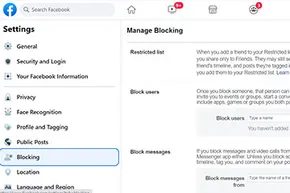
ブロックを実行する方法は次のとおりです。
- プロフィール ページの右上隅にある 3 つの点 をクリックします。
- [プロファイルとタグの設定 ] を選択します。
- [設定] で [ブロック ] を選択し、[ブロックの管理 ] をクリックします。
- [ユーザーをブロック ] ボックスに、ブロックするユーザーの名前または電子メール アドレスを入力します。
- [完了 ] をクリックします。
注意: メッセンジャー アプリからの招待を停止するには、同じセクションの [からの招待をブロック ] の横のボックスをオンにします。
The Subtle Art of Hiding
Not all relationships require a digital deadbolt. Sometimes you just need silence.
Hiding someone on Facebook is another option to block someone. It’s not that extreme and it’s hard to notice. It’s the right thing to do for your high school friend who keeps posting new business posts, or your acquaintance who shares too many gerbils. It’s also safer for people you meet in real life. You can avoid sudden disconnection altogether.
The hide feature works differently. You can prevent your friends’ posts from appearing in your news feed. But that doesn’t mean disconnection.
Your friends can still:
* See your posts.
* Comment on your updates.
* Send you a message.
* Write on your timeline.
They will still remain in your friends list. If you miss an important update, you can still go directly to their profile and read their posts.
To hide specific posts or users:
- Move the mouse pointer to the right side of the post that is annoying you.
Click the three buttons next to the name (usually three dots or a menu icon).
A drop-down menu will appear.
Here are three options.
- Hide this post: Just remove this update from your feed.
- Snooze for 30 Days: Mutes their content for 1 month. This is the perfect buffer if you need a break.
- Unfollow: Block all posts from this person from being displayed on your page. Crucially, you remain friends. You just stop seeing their content.
Unfollowing is the most common middle ground. It is clean. It is very quiet.
If you change your mind later — if your political views change, or if you get tired of ignoring your friend’s endless vacation photos — you can bring them back.
Go to the profile of the person you unfollowed. See the Posts section. You will receive a notification that you have unfollowed them. Click Undo.
They’re back in your feed. The connection remains intact. The drama is avoided.
What approach do you take when someone crosses the line? Blocking ends the conversation. Hiding it only reduces the volume. Neither option has warning labels. You have to decide how much noise you can tolerate.


