You are ready to buy tickets for that local show. The cart is full. The payment details are entered. Then, the wall goes up.
It’s a CAPTCHA.
The acronym stands for Completely Automated Public Turing Test to Tell Computers and Humans Apart. It sounds like something out of a sci-fi thriller, but it’s just a digital bouncer. The test isn’t hard for humans. If you’re a real person, you’ll breeze through it. For a computer? It should be nearly impossible.
The goal is simple: identify malicious bots before they can mess with your data or your purchase.
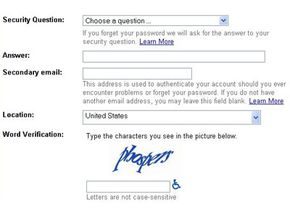
These tests are also known as Human Interaction Proof (HIP). You’ve seen them everywhere. The classic version shows a string of distorted, blurry letters. You type them in. If you match the image, you pass.
It’s that simple. Or it used to be.
The Evolution of Image-Based Challenges
Text-based CAPTCHAs are getting old. Bots are getting smarter. Now, image recognition challenges are the standard.
Instead of typing letters, you get a grid of photos. Highways. City streets. Parks. You are asked to select images containing specific objects.
- Street lights
- Fire hydrants
- Bicycles
- Crosswalks
Select the right photos. Pass the test.
Image-based CAPTCHAs are significantly harder for bots to decipher than text-based ones. Distorted images or blurry scenes frustrate a bot’s recognition techniques. Crafting a test that only a human can solve requires careful design.
Why Fight Bots at All?
Why create a test to separate humans from machines?
Because people try to game the system. They exploit weaknesses in the computers running the site.
These individuals are a minority of internet users. But their actions affect millions.
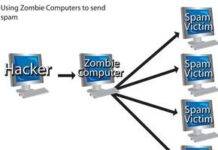
Consider a free email service. Without a CAPTCHA, it might get bombarded by automated account requests. An automated program creates thousands of accounts in seconds. Why? To send spam mail to millions of people later.
The CAPTCHA stops this. It identifies which users are real human beings. And which ones are just computer programs.
Every Failure Is an AI Breakthrough
Here is an interesting twist.
The people who design these tests aren’t always upset when they fail.
For a CAPTCHA test to fail, someone must find a way to teach a computer how to solve it.
Every time a bot beats a CAPTCHA, it represents an advance in artificial intelligence.
The irony is palpable. A CAPTCHA application generates a test that even it cannot solve without already knowing the answer. It relies on human cognition as a security parameter.
We are in an arms race.
Bots get smarter. The tests get harder. The users get annoyed.
But until the technology catches up to the humans, we will keep clicking on traffic lights.
The whole system traces back to the Turing Test. Alan Turing, the guy who basically invented modern computing, wanted a way to check if machines could mimic human thought. The setup was simple. An interrogator talks to two hidden participants. One is a person. One is a computer. If the interrogator can’t tell which is which, the machine wins.
CAPTCHA flips this logic. The goal is to make a test that humans breeze through while bots fail spectacularly. It has to be dynamic too. If every user saw the exact same static image with the same letters, spammers would crack it in minutes. They’d just write a script to type the answer automatically.
Most of these tests are visual. Computers are still clunky at processing images compared to us. Humans spot patterns instantly. We even hallucinate them sometimes. That’s pareidolia. You see a face in the clouds or a figure on Mars. Your brain forces random noise into a recognizable shape. Machines don’t have that intuitive leap. They struggle with ambiguity.
But relying solely on sight is risky. It alienates visually impaired users. So we have alternatives. Audio CAPTCHAs are common. You listen to a string of numbers or letters. The voice might be distorted. There’s often background static. This blocks voice recognition software.
Then there’s contextual CAPTCHA. It presents a short text passage. The user has to interpret the meaning. Algorithms can grab keywords. They fail at actual comprehension. They don’t get the nuance.
Sometimes the test is just broken. The image is so warped that even humans can’t read it. That’s why you get a “refresh” button. You try again. Hopefully, the second attempt isn’t gibberish.
Who Uses CAPTCHA
The next section dives into which sites actually deploy these checks to verify you’re not a bot.
Polling Integrity and Bot Abuse
The 1999 Slashdot poll on the best computer science graduate program is a cautionary tale. It showed exactly what happens when you leave surveys open to automated scripts. Students at Carnegie Mellon and MIT built bots to flood their respective schools with thousands of votes. Meanwhile, every other university scraped by with a few hundred.
If code can cast a ballot, the results are garbage.
This is why verification matters. Without a filter, online polls are just popularity contests for whoever has the fastest script. CAPTCHA stops programmers from gaming the system.
Blocking Spam Bots at Registration
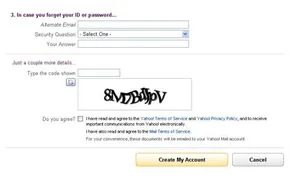
Think about the last time you signed up for Hotmail, Yahoo! Mail, or Gmail. You typed in some personal details. The service didn’t check if they were real. It didn’t call you or verify your identity.
It just wanted to make sure a bot wasn’t trying to create hundreds of spam accounts in seconds.
Free email providers use CAPTCHA to stop spammers. Without it, your inbox would be clogged with junk from fake accounts before you even finished setting up yours.
Fighting Ticket Scalpers
Ticket brokers like TicketMaster also rely on these filters. Why? To stop scalpers.
Scalpers use bots to buy thousands of tickets for big events in seconds. Legitimate fans get locked out. Events sell out instantly. Scalpers then resell those tickets at inflated prices.
CAPTCHA doesn’t stop scalping entirely. It just makes large-scale automated buying much harder. It slows down the bots. It gives real humans a fighting chance.
Keeping Message Boards Clean
Web pages with contact forms or message boards face the same threat. An avalanche of spam can drown out real conversations.
CAPTCHA programs filter out the noise. They stop bots from automatically posting rude messages or harassing administrators. It’s not a perfect shield against a determined human troll. But it stops the automated flood.
The Double Duty of reCAPTCHA
The standard CAPTCHA asks you to type distorted letters and numbers. But creators found a way to add value to that task. They used it to digitize books.
This is reCAPTCHA. It harnesses your responses to verify scanned paper. Computers struggle to read words from digital scans. Humans are good at it.
Here is the process:
- The administrator scans a book.
- The program picks two words from the image.
- One word is already recognized.
- If you type it correctly, the system assumes your second word is correct too.
- That second word goes into a pool for other users.
- As more people type it, the system verifies the word with high certainty.
It sounds tedious. But you are doing two jobs at once. You are proving you are human. You are also helping search engines index scanned documents.
Creating the Verification
Next, we’ll take a look at the process that goes into creating a CAPTCHA.
Designing for the Gap Between Human and Machine
The entire premise of a CAPTCHA rests on a fundamental disconnect. Humans perceive context. Machines process instructions. If data falls outside a rigid algorithmic path, a bot stumbles. It doesn’t improvise. It fails.
A designer must exploit this weakness. Consider metadata. It’s invisible to you. It’s readable by a script. If you build a visual challenge where the answer is hidden in the image file’s metadata, you’ve already lost. A simple script can strip that data and reveal the solution instantly.
Distortion is non-negotiable. Plain text is an open invitation for optical character recognition (OCR) software. Those programs scan shapes. They recognize straight lines and curves. If your characters aren’t warped, skewed, or obscured, a bot will read them faster than a human can blink.
Humans should have an 80 percent success rate. Machines should sit at 0.01 percent.
This benchmark comes from Microsoft Research experts Kumar Chellapilla and Patrice Simard. They didn’t just guess. They calculated the threshold between usability and security.
There are two main ways to generate these challenges. The first is static. You pre-define the images and their solutions. You need a massive database to support this. Why? Because a spammer who steals that database can launch a brute force attack. They just cycle through every possible answer until one sticks. To stay safe, you’d need a database with over 10,000 unique CAPTCHAs. That’s heavy. It’s risky.
The second way is dynamic. Randomization. The system generates a unique string of letters and numbers every time. You will never see the same sequence twice. This kills the brute force approach. The odds of a bot guessing a long, random string are astronomically low. The longer the string, the safer you are.
The Visual Gauntlet
How do you distort text? There are a few tricks in the toolkit.
Some systems stretch and bend letters until they look like they’re viewed through melted glass. It’s nauseating. It’s also effective. Others overlay a crosshatched grid of bars to fracture the letterforms. You might see fields of random dots or clashing color schemes designed to confuse the eye and the algorithm. The goal is always the same: create noise that humans can filter out but machines cannot parse.
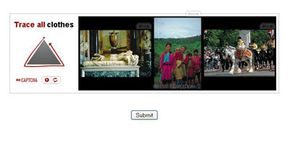
Pattern recognition is another avenue. Instead of just reading text, you might be asked to complete a sequence. A series of shapes appears. Which one comes next? It tests logic, not just vision. But here’s the catch. Not everyone is good at abstract reasoning. If your puzzle is too hard, your human success rate drops below that critical 80 percent. You start locking out real users. You trade security for accessibility. It’s a tightrope walk.
The Audio Alternative
Can you hear me now?
Audible CAPTCHAs follow a similar logic to visual ones, but with a different medium. You’re listening for characters spoken by a synthesized voice or a real human recording.
The static approach requires pre-recording every possible combination. That’s a massive audio library. The dynamic approach is smarter. It records individual phonemes or characters and strings them together in real-time. It’s faster to generate. It’s harder to index.
But audio isn’t perfect. Background noise. Accents. Synthesis artifacts. It introduces a new layer of friction. Does it solve the problem? Sometimes. For some users, it’s a lifesaver. For others, it’s a puzzle they can’t solve.
The Arms Race Continues
We’ve seen how they are built. The next step is watching them fall. Computers are getting better at this. They’re learning to see through the distortion.
The real hurdle isn’t deciphering the text. Humans should hit that 80 percent accuracy rate with ease. The actual nightmare is teaching a machine to process information like a human brain does. Most attackers don’t bother trying to make computers smarter. They just strip away the complexity of the challenge.
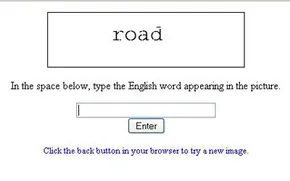
Think about a standard web form protected by a CAPTCHA showing English words. The font gets warped. Letters stretch and bend in chaotic patterns. A random background noise sits behind the text. It looks like gibberish. It’s designed to be.
A programmer breaking this doesn’t start with AI. They start with an algorithm. This is just a set of instructions. Step one might be converting the image to grayscale. Color is a layer of obfuscation. Remove it. Now you have black and white noise.
Next, the code scans for patterns. It compares shapes to known letters. If the match is weak, the algorithm cross-references those partial letters with a dictionary of English words. It guesses the rest. This brute-force logic works. It fails sometimes. But if it succeeds often enough, spammers win.
Beating the Gimpy Challenge
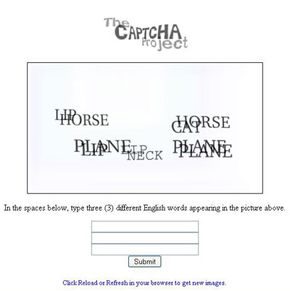
What happens when the CAPTCHA gets tougher? Take the Gimpy version. It displays ten words. Warped fonts. Irregular backgrounds. The words overlap. You have to type three correct ones to proceed.
It sounds solid. Until you look at the research. Greg Mori and Jitendra Malik published a paper on how to crack it. Their trick? The system uses real words. Not random strings. This is a massive weakness.
Mori and Malik built an algorithm focused on the start and end of word strings. They used the known 500-word dictionary of the Gimpy system. They ran tests. The algorithm correctly identified words 33 percent of the time.
That number seems low. It’s not. Spammers don’t need perfection. They need volume. If their bots run hundreds of times per minute, a one-in-three success rate is profitable. The math works.
Electronic Ears
Audio CAPTCHAs aren’t safe either. Spring 2008 saw reports of hackers beating Google’s audio system. The method was surprisingly simple.
Hackers created a library of sounds. Each character in the database needed a sonic match. Distortion might mean multiple sounds for one letter. Once categorized, they used voice-recognition software variants. The bot listened. It interpreted. It typed.
CAPTCHA and Artificial Intelligence
The AI Paradox: Why Breaking Security Helps Machines Learn
Luis von Ahn, the Carnegie Mellon professor who helped invent CAPTCHA, sees things differently than the average sysadmin. In a 2006 lecture, he framed the battle between humans and bots not as a war, but as a training ground for artificial intelligence. The logic is cold but sound. Spammers and hackers are obsessed with breaking CAPTCHAs because those tests stand between them and their goals. They invest time and energy into defeating them.
When they succeed, machines get smarter.
Every time a researcher figures out how to teach a computer to solve a distorted text puzzle, we take a step toward true AI. For von Ahn, a defeat for the security system is a victory for machine learning.
Web administrators, however, find this philosophy less appealing. They still have to deal with the fallout. Spam bots and malicious scripts don’t care about the philosophical implications of their defeat. They just want in. The reality is that several CAPTCHA systems have already fallen out of effective use. Maintainers of online polls or simple websites need to know which tools are still reliable. They need to stay updated. If one system fails, the code has to go. It needs to be replaced.
Designers walk a tightrope. As computers get more sophisticated, the tests must evolve. But there is a limit. If the test becomes so hard that humans can no longer solve it with a decent success rate, the system fails. It’s not just about warping text anymore. The answer might be a math equation. Or answering questions about a short story.
How many people will bother posting a reply to a message board if they have to solve a quadratic equation first?
User interest drops when the friction gets too high. The balance is fragile.
The Evolution of Invisible Verification
Google changed the game in 2014. The company, which had acquired reCAPTCHA in 2009, began phasing out the classic image or text challenges. They introduced “No CAPTCHA.” It was simple. A single box with the words “I am not a robot.”
Users clicked. The world moved on.
But by 2017, even that was too obvious. Google announced the removal of No CAPTCHA. The new approach relied on behavioral analysis. It looked at how you moved your mouse pointer. It analyzed your browsing habits. This became known as Invisible reCAPTCHA.
If the system flagged you as suspicious—perhaps you were a robot—you were forced to solve one of the older, standard challenges. It was a fallback. A verification step. The goal was to keep the good users moving while catching the bad actors without them even noticing.
Clarifying the Terminology and Necessity
There is often confusion about who owns what and why these checks exist.
Is CAPTCHA by Google?
No. CAPTCHA is a general technology used across the web to ensure humans, not automated bots, are interacting with a site. Google’s reCAPTCHA is just one implementation of this broader concept.
What does CAPTCHA stand for?
It stands for “Completely Automated Public Turing test to tell Computers and Humans Apart.” It is a challenge-response test built into computing to verify user identity.
Why is CAPTCHA needed?
It prevents automated programs from submitting false information. It stops ad spammers from promoting scams on webpages. It keeps the internet from being flooded by noise.
Where to Go From Here
The landscape shifts constantly. What worked yesterday might be broken today.
For those digging deeper, related topics include how code breakers operate, the mechanics of spam, and the function of spyware. Understanding encryption and computer viruses provides context for why security matters. The underlying logic of how a logical machine generates random numbers also ties into the randomness required for secure challenges.
More resources on the subject include Gwap and the official reCAPTCHA site. The academic roots of this field are well-documented. Research by Chellapilla and Simard at Microsoft Research highlights how machine learning can break visual proofs. Collaborative filtering CAPTCHAs were explored in early workshops. The vulnerability of Google’s audio CAPTCHA was documented in 2008. Spammers cracked Gmail’s CAPTCHA that same year.
The Turing Test, as discussed in the Stanford Encyclopedia of Philosophy, remains the theoretical baseline. The human cortex still beats the CPU in many tasks, as noted by Wired. But the gap is closing. Von Ahn’s original vision is playing out in real-time. Every broken code is a lesson for the next generation of AI.
The question is no longer if machines will pass these tests. It’s what happens when they do. And what happens to the humans who still have to click the boxes.