The internet is a strange thing. You pay for the connection. Then you use that connection to save money. It is a paradox that works. You can find cheaper electronics. You can book flights for less. You send photos and videos for free. Voice over IP (VoIP) takes this further. It lets you make calls without paying for postage. Long distance? International? It can be free.
Several services offer this now. Skype and Vonage are the big names. Both use VoIP. They are not the same. One might fit your needs. The other might not. We will look at how they work. We will help you decide.
How Voice Over IP Works
Both services rely on similar basic hardware. You use a computer. You need a microphone. Speakers or a headset work too. Some people use an IP phone. Others plug a regular phone into an analog telephone adapter.
This gear does the heavy lifting. It takes your voice. It turns analog sound into digital signals. Those signals travel over the internet. The destination device does the reverse. It turns digital back into analog sound. This process differs from plain old telephone service (POTS).
“VoIP uses a technique called packet switching to send a call over the Internet.”
This packet switching is key. It breaks your voice into data packets. Those packets hop across the web. They reassemble at the other end.
The Price Difference
Cost is a major factor. Skype and Vonage are cheaper than traditional lines. This is true especially for long-distance calls. Skype can be free. It depends on how you use it. Vonage charges for most calls. But the price isn’t the only difference.
Behind-the-Scenes Differences
The technology under the hood varies greatly. Skype uses a peer-to-peer network. It is similar to KaZaA. Developers of KaZaA built Skype. It uses a proprietary protocol. Security is handled by 256-bit Advanced Encryption Standard (AES). Your call data is encrypted.
Vonage is different. It does not use peer-to-peer technology. It uses Session Initiation Protocol (SIP) to handle calls. There is no apparent encryption on call data. This matters for privacy. It matters for compatibility.
Opening a Skype Account
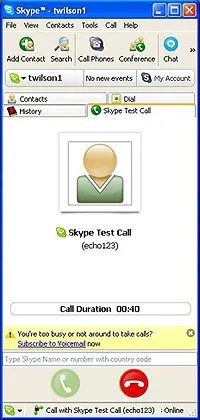
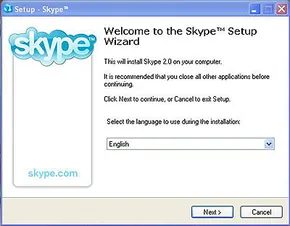
Getting started with Skype is about as frictionless as internet services get. You head to the homepage, click “Download Now,” and install the soft phone client. It’s a desktop application that sits in your system tray, complete with an on-screen keypad if you prefer tapping numbers rather than using a physical headset.
Once installed, the “Getting Started” wizard walks you through the basics. You can add contacts, make test calls, and import your existing address book. If you haven’t already, the software prompts you to create your username and password directly from the client.
How Skype Works as an IM Client
The interface looks and functions almost exactly like an instant messaging (IM) client. That’s the point. You set your online status, browse your contact list, and decide who to engage with.
But there’s a catch. To use these features—or to make actual voice calls—your computer must be on and connected to the internet. The application must also be running. It’s not a standalone phone line. It’s a service layered on top of your broadband connection.
For most users, the pricing model is the biggest draw. Calls between two Skype users are free. Period. Until the end of 2006, outbound calls to traditional landlines and cell phones were also free. That changed on January 1, 2007.
To receive incoming calls from traditional phones, you must purchase Skype Credit and use the add-on SkypeIn service.
After that date, calling non-Skype numbers costs $29.95 per year for unlimited minutes to land lines and mobile phones. Skype-to-Skype calls remain free indefinitely. If you want people to call you on your Skype number, you have to buy SkypeIn. It’s not free. It requires purchasing credit and configuring the service.
The Vonage Alternative
This setup is significantly different from what you need to do to get started with Vonage. Opening a Skype account is like starting an IM account. Opening a Vonage account is more like getting set up with a new ISP.
You don’t download a program for Vonage. Instead, you go to their website and fill out forms. It’s a multi-step process designed to establish a legitimate telephone identity.
The service is not provided for free. You are paying for a dedicated voice line. The signup flow involves:
- Selecting a service plan (prices start at around $14.99 a month)
- Choosing whether to keep your existing phone number or get a new one
- Choosing the equipment that will allow you to use the service
- Entering your name, address, and phone number for 911 calling purposes
Skype requires a computer. Vonage requires a contract and hardware. One is a digital add-on. The other is a replacement for your copper wire.

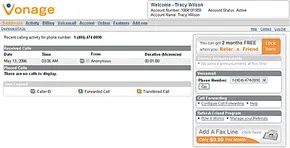
Vonage setup: Hardware requirements and initial configuration
Skype lets you jump straight into calls with nothing but a microphone and a browser. Vonage doesn’t work that way. You need physical hardware to bridge the gap between your internet connection and the public telephone network.
You have options here.
The easiest path is buying an Ethernet router that has a built-in telephone adapter. Vonage often offers this unit for free if you claim a rebate. It’s the simplest route because you get one box to manage both connections.
Another route involves standalone adapters. These plug into your router and let you connect any standard landline phone. You can also buy specialized VoIP phones if you want the full digital experience.
There’s a third option: rewiring your house. This involves hardwiring your regular phone jacks directly to the Vonage adapter.
Do this only if you own your home outright.
If you rent, or if your walls are shared with neighbors, this is a bad idea. You’re running telephone lines through walls that don’t belong to you. It’s messy and potentially problematic for the building’s infrastructure.
You can also skip the hardware entirely by using a soft phone client. This is software that runs on your computer or mobile device. It works similarly to Skype. But be aware: this is an add-on service. It’s not part of the basic Vonage package. You’ll pay extra for the privilege.
Configuring the account and preparing for installation
Once you sign up, you don’t wait for the mail. You get access to a web interface immediately.
This dashboard lets you view call history. You can change account settings. There’s also an online guided tour.
Use it.
The tour shows you exactly what options are available. It highlights features you can add or modify before the hardware even arrives. It’s a good way to get oriented.
When the equipment ships, the clock starts.
Unless you pay for professional installation, you’re on your own. The box will contain instructions. They are usually complete. The setup process is rarely complicated.
But there is one step you must do before you unbox anything.
Write down your ISP settings.
Specifically, the details your Internet Service Provider uses to authenticate your connection. If you don’t have this info handy, the adapter won’t know how to talk to the internet. You’ll be stuck staring at a blinking light.
The exact steps depend on what you bought and what you already have. If you’re using a new router, it’s straightforward. If you’re plugging an adapter into an old DSL modem, it might require more tweaking.
But the core requirement is always the same: you need to know how your internet connects.
Once you have those credentials, the rest is just following the manual. It’s not magic. It’s just networking.
The real test comes when you make that first call. Does the audio crackle? Is there delay?
Most users find it works fine. Some don’t. It depends on the quality of your internet connection and how well you configured the adapter.
There’s no universal answer.
You just have to try it.
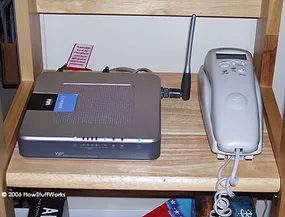
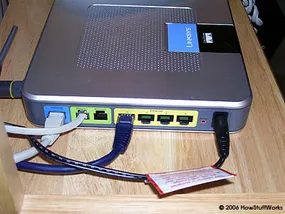
The hardware and pricing models for Skype and Vonage diverge sharply. But the real chasm lies in how they handle emergency calls. One treats voice as an app. The other treats it as a service. We are looking at the mechanics of connecting calls, but first, we must address the gap in safety.
The 911 Gap: Home Phone Replacement Myths
Skype is not a home phone replacement. It is a supplement. You might be tempted to cut the cord on your landline entirely. Don’t. You cannot dial 911 through Skype. Period. This isn’t a bug. It’s a feature set that simply doesn’t exist in their free or paid consumer tiers. If your house is on fire and your broadband is the only line out, you are stuck.
Vonage operates differently. They offer 911 capabilities. But the process isn’t automatic. You have to actively set it up. You have to activate it. If you don’t, you’re flying blind.
Not every Vonage subscriber has access to E911. This service transmits your registered name and physical address to the Public Safety Answering Point (PSAP). It’s crucial for responders to know where you are. Without it, they are guessing. As of March 30, 2006, roughly 70 percent of Vonage customers had access to this feature. The other 30 percent were left without that layer of location data.
There is another vulnerability. Both services rely on the Internet. Vonage typically requires a powered router to function. If the electricity goes out, the router dies. If the router dies, the VoIP connection dies. You lose 911 access. You lose all voice access.
“One of the reasons why you shouldn’t replace your home phone service with Skype is that you cannot use it to dial 911.”
Calling with Skype and Vonage
How do these platforms actually bridge the gap between callers? The methods differ. Skype pushes data packets. Vonage often pushes through traditional telephony networks (PSTN) when connecting to non-VoIP numbers. The experience feels similar. The infrastructure underneath is not.
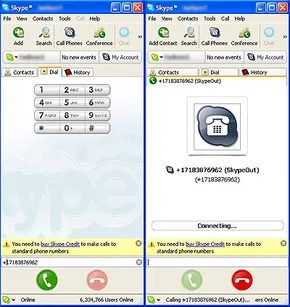
Testing VoIP: Skype vs. Vonage in the real world
We moved past the installation phase. Now came the actual testing. Skype has a built-in sanity check called “echo1234.” You dial it after signing in. The program plays back whatever you say. It’s a quick way to verify your audio stack is functioning. If you hear your own voice bouncing back, you are good to go.
Receiving calls on Skype feels familiar to anyone who uses instant messaging. A ring tone plays. The interface icon flashes. You see who is calling if they are another Skype user. Then you choose to accept or ignore. It is low pressure.
We needed a baseline for quality. So we called the same number using both services. Specifically, the They Might Be Giants Dial-a-Song line. This was a chance to test long-distance capabilities. Skype requires the “+” character before the number to reach traditional landlines. We typed it in just like a regular dial.
The connection worked. The call went through. But the song was gone. Instead of music, we got screeching static. The line was broken. Since we were using a laptop’s built-in hardware, the audio was naturally distorted.
Hardware matters. Using a headset or a WiFi phone adapter changes the game. It improves quality substantially. Relying on internal speakers and mics introduces noise and compression artifacts.
Vonage felt different. It behaved exactly like a traditional landline or cell phone. There were no interface quirks. We dialed the same broken Dial-a-Song line. The result was identical. The service worked. The content was still dead air.
Sound quality is the main concern for VoIP users. In our Vonage tests, the audio was crisp. The difference between their service and traditional phone lines was comparable to the gap between MP3s and CDs. It was noticeable. Skype calls were good for a free service. But they suffered when we used the laptop’s native hardware.
The quality of your internet connection dictates the experience. Data packets can be lost or slowed down. This causes distortion. Parts of a conversation can vanish entirely. Some users report echoes. We did not encounter this in our specific test environment. But it is a known risk.
So which one should you use? It depends on your needs. If you want to replace your home phone entirely, Vonage or a similar full-service VoIP plan is the logical choice. It offers reliability. Skype is better as a supplement. It is great for free calls to friends who also use the app. It is convenient. But it is not a full replacement for your primary line.
The scale of adoption
The user base tells a story of early adoption. By April 2006, Skype had reached 100 million downloads. Vonage had 1.6 million subscribers. The gap was significant. It highlighted the difference between casual experimentation and committed subscriber services.